Run of Show: How to Write a Minute-by-Minute Event Schedule
ScanSync Team · · 7 min read
A run of show is the single document that turns your event plan into action on the day. It lists every moment in order, with times, durations, owners, locations, and cues, so the whole team knows what happens next without needing to ask. This guide explains how a run of show differs from an agenda, which columns to include, how to build in buffers, and how to rehearse and manage versions, with a template you can copy.
If you're still earlier in the process, our step-by-step guide to planning an event covers the bigger picture, and the event planning checklist shows when the run of show should be drafted and finalised.
Run of show vs agenda
The two documents cover the same event but serve different people.
| Agenda | Run of show | |
|---|---|---|
| Audience | Attendees | Staff, suppliers, speakers |
| Detail | Session titles and rough times | Minute-by-minute actions and cues |
| Includes | What, when, where | What, when, where, who, how, and what if |
| Shared | Publicly | Internally |
An agenda might say "9:30 Welcome." The run of show says that at 9:28 the walk-in music fades, at 9:29 the host is standing by stage left with a handheld mic, at 9:30 the lights dim and the voice-over introduces the host, and the slide changes to the welcome title. Without that detail, small delays and missed cues pile up quickly.
The columns every run of show needs
Keep the structure consistent so people can scan it fast. These seven columns work for most events:
- Time - the clock time the item starts
- Duration - how long it should take, so you can see the knock-on effect of overruns
- Segment - a short name, like "Doors open" or "Keynote Q&A"
- Owner - one named person responsible, not a team
- Location - the room, stage, or area
- Cues - what triggers the item and what happens technically (lights, slides, mics, music)
- Notes - anything else: contingencies, reminders, contact numbers
Some teams add columns for AV detail, catering, or a "status" tick box. Add what you need, but resist making it so wide that nobody can read it on a phone.
Run of show template
Here's an example for the first part of a half-day conference. The times and names are illustrative; replace them with your own.
| Time | Duration | Segment | Owner | Location | Cues | Notes |
|---|---|---|---|---|---|---|
| 07:30 | 60 min | Crew call and setup | Event lead | Main hall | Venue opens loading door | Check power at registration |
| 08:30 | 15 min | Check-in team briefing | Check-in lead | Foyer | Test scan on every device | Confirm lookup by name works |
| 08:45 | 15 min | Tech check and walk-in music | AV lead | Main hall | Slides on holding screen | Mics tested and labelled |
| 09:00 | 30 min | Doors open, check-in | Check-in lead | Foyer | Event lead gives go on radio | Watch arrivals; open extra lane if needed |
| 09:28 | 2 min | Five-minute call | Stage manager | Main hall | Music fades, announcement | Host stands by stage left |
| 09:30 | 10 min | Welcome | Host | Stage | Lights dim, voice-over, slide 1 | Housekeeping and exits |
| 09:40 | 35 min | Keynote | Speaker 1 | Stage | Lapel mic live, slide deck 2 | Clicker on lectern |
| 10:15 | 10 min | Q&A | Host | Stage | Two roving mics | Hard stop at 10:25 |
| 10:25 | 5 min | Buffer | Stage manager | Main hall | - | Absorb overrun |
| 10:30 | 30 min | Coffee break | Catering lead | Foyer | Doors to foyer open | Late arrivals still checked in |
Building buffers into the schedule
Events almost never run exactly to time. The question isn't whether you'll slip, but where you'll absorb it.
Where to add buffers
- Before the first session. Late arrivals and a slow-moving queue push everything back.
- Between speakers. Mic changes, laptop swaps, and walk-ons take longer than you think.
- Before breaks and meals. Catering is usually ready at a fixed time; let the programme flex, not the food.
- At room changes. Moving a large group between spaces is slow.
A common rule of thumb is to plan a few minutes of buffer for every hour of programme, plus a larger one before anything with a fixed start, like a live stream or a meal service. Mark buffers as their own lines so nobody fills them by accident. Thinking about which items are on your critical path, a term from the critical path method, helps you decide which segments can shrink and which can't.
Decide in advance what gets cut
Write down what you'll shorten if things run late: Q&A, a video, or a networking block. The stage manager can then make the call in seconds instead of holding a meeting in the wings. Think of it as a small contingency plan for the schedule itself.
Doors-open and check-in timing
The first hour is where many schedules slip. If the programme starts at 9:30 but half the room is still queuing at the door, you'll either start late or start to an empty room.
- Open doors early enough. For most events, 30 to 60 minutes before the start is typical. The right number depends on attendance, how many entry lanes you have, and whether people collect badges.
- Brief the check-in team before doors open. Put the briefing in the run of show, with a test scan on every device.
- Give one person the go. Doors open when the event lead says so, not when the first guest knocks.
- Watch the arrival rate. A live check-in count tells you whether to hold the start for a few minutes or begin on time.
With ScanSync, the check-in lead and event lead can both watch the live dashboard on their phones, including how many people have arrived, who is still to come, and check-ins per 15 minutes. Our guide to real-time attendance tracking explains how to use that data on the day, and the conference registration desk checklist covers desk setup.
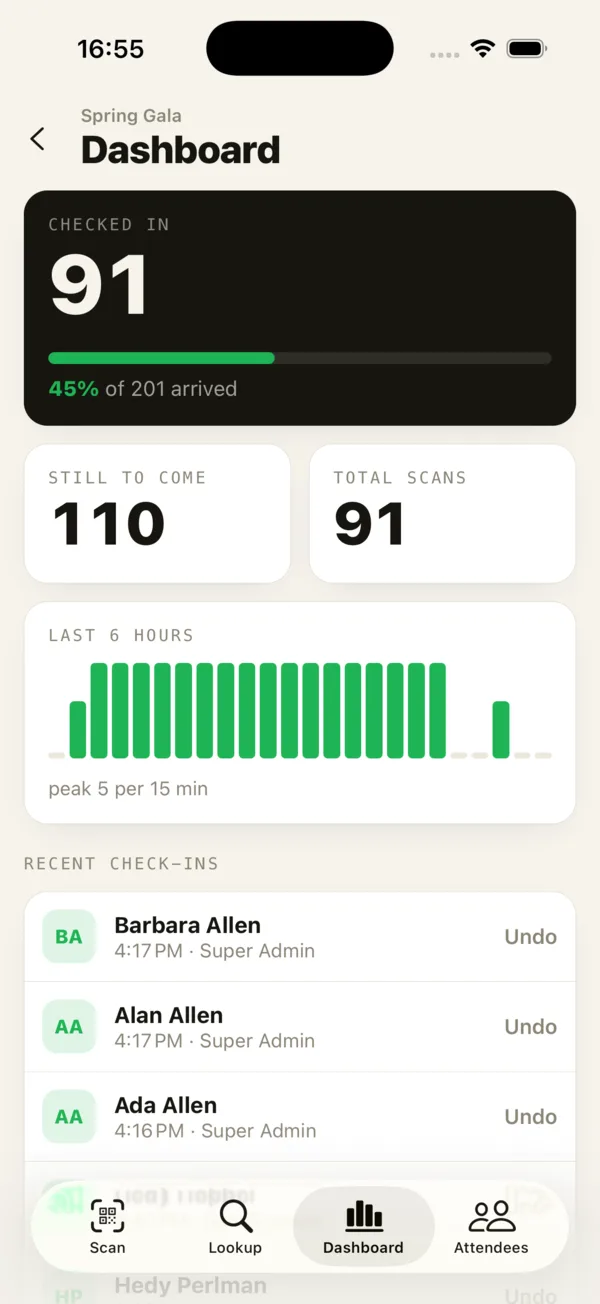 The phone dashboard lets the event lead see arrivals without leaving the stage area.
Rehearsal and version control
Rehearse with the real document
Run at least one walkthrough with the actual run of show in hand. For big productions, that means a full technical rehearsal; for smaller events, a 30-minute talk-through with the core team is enough. Note every timing that felt rushed or long, and update the document immediately.
Keep one master version
Version confusion causes real problems: the AV team follows version 4 while the host has version 6. To avoid it:
- Keep one master file, owned by one person
- Put the version number and time of last edit at the top of every page
- Share a link rather than attachments where possible
- After the final rehearsal, lock the document and print a few copies as a backup
- Mark late changes clearly, for example in bold, and announce them
A day-of communication channel
A run of show only works if people can react when it changes. Set up one channel for the day, such as a radio channel, a group chat, or both, and write it into the document.
- List every key role with a name and phone number at the top of the run of show
- Agree on short, standard calls: "Standby", "Go", "Holding", "Running five minutes late"
- Decide who can change the schedule on the day (usually just the event lead or stage manager)
- Keep problem-solving off the main channel; move it to a side conversation
Our event communication plan goes into more detail on team channels and escalation, and the event risk management plan covers what to do when something goes seriously wrong.
Summary
A run of show turns your event plan into a minute-by-minute script your whole team can follow. Use consistent columns for time, duration, segment, owner, location, cues, and notes, and build buffers where events usually slip, especially around doors-open and transitions. Rehearse with the real document, keep one master version, and agree on a single communication channel for the day. Done well, it lets everyone focus on guests instead of asking what happens next.
Next steps
Copy the template above into a shared spreadsheet and start filling it in from the moment doors open. When you're planning the check-in portion, you can create a free account and test scanning with your own list, or see the check-in features.
Frequently asked questions
What is a run of show for an event? +
A run of show is a detailed timeline of everything that happens during an event, usually minute by minute, listing who is responsible, where it happens, and what cues trigger each step. It is an internal document for the team, not a public agenda.
Who should have a copy of the run of show? +
Everyone with a role on the day: the event lead, stage manager, AV team, venue contact, catering lead, speakers or performers for their segments, and the check-in lead. Some planners share a trimmed version with suppliers that only shows their parts.
How detailed should a run of show be? +
Detailed enough that someone who missed every planning meeting could follow it. For stage segments that often means one line per minute or per cue; for quieter periods like lunch, one line per block is usually enough.
Check people in the simple way
Upload your list, scan at the door, and watch arrivals live. Free for your first event.