Event Planning Checklist: From 6 Months Out to the Day After
ScanSync Team · · 6 min read
This event planning checklist breaks the whole process into a timeline, from three to six months out through to the day after. It is written for a typical mid-sized event, such as a conference, gala, workshop, or company party with somewhere between 50 and 500 guests. Smaller events can compress the timeline, and larger ones should start earlier. Copy it into your own document, assign an owner to each item, and tick things off as you go.
If you want the reasoning behind each stage, read our step-by-step guide on how to plan an event alongside this checklist. If you need to convince a stakeholder that this level of preparation is worth it, see why event planning is important.
How to use this checklist
Before you start, set up three things:
- A single shared document or spreadsheet with this checklist, so everyone works from the same version.
- An owner and due date for each item. "Team" is not an owner. Use a name.
- A weekly check-in of 15 to 30 minutes to review progress and flag blockers.
Here is an overview of the stages:
| When | Focus |
|---|---|
| 3 to 6 months out | Purpose, budget, date, venue, team |
| 2 months out | Suppliers, program, registration |
| 1 month out | Promotion, details, risk planning |
| 2 weeks out | Final numbers, run of show, check-in setup |
| 1 week out | Confirmations and briefings |
| Day before | Setup and testing |
| Day of | Arrival, running the program |
| Day after | Thanks, data, payments, review |
For larger projects, a Gantt chart helps visualize dependencies between tasks.
Early planning: 3 to 6 months and 2 months out
The early months are about decisions that are hard to change later. Get these right and the rest of the checklist becomes much easier.
3 to 6 months out: foundations
- [ ] Write a one-sentence purpose for the event
- [ ] Set two or three measurable goals (see event goals and KPIs)
- [ ] Estimate audience size and profile
- [ ] Set a budget range with a contingency line (see event budget planning)
- [ ] Shortlist two or three possible dates and check for clashes
- [ ] Research and visit venues (see how to choose an event venue)
- [ ] Book the venue and read the contract terms carefully
- [ ] Decide the format: in person, online, or hybrid
- [ ] Name an event lead and owners for each major area
- [ ] Create a shared planning document and timeline
- [ ] Check whether you need permits, licenses, or insurance, and ask a qualified professional if unsure
2 months out: suppliers and program
- [ ] Request quotes from catering, AV, furniture, photography, and security suppliers
- [ ] Book suppliers and confirm everything in writing
- [ ] Draft the agenda, with breaks every 60 to 90 minutes
- [ ] Invite speakers, performers, or hosts and confirm their requirements
- [ ] Decide on registration or invitations and what information to collect
- [ ] Set up your attendee list as one spreadsheet with clear columns
- [ ] Plan accessibility: step-free routes, seating, signage, and digital content (the W3C introduction to accessibility is a good starting point for online materials)
- [ ] Draft your event communication plan for attendees and the team
The final month: 1 month and 2 weeks out
The final month shifts from big decisions to detail. This is when attendee numbers firm up, so keep the budget and headcount estimates up to date as replies come in.
1 month out: promotion and detail
- [ ] Send invitations or open registration if you have not already
- [ ] Schedule reminder messages
- [ ] Collect dietary and access needs from attendees
- [ ] Do an initial risk assessment: weather, supplier failure, medical, crowding, technology (see event risk management plan)
- [ ] Recruit volunteers or extra staff, including for check-in
- [ ] Order signage, badges, printed materials, and supplies
- [ ] Plan the arrival area and how guests will be checked in
- [ ] Review the budget: estimates vs. actuals so far
2 weeks out: final numbers and setup
- [ ] Give the caterer an estimated final headcount
- [ ] Write the run of show, minute by minute, with owners
- [ ] Clean and deduplicate the attendee list
- [ ] Import the list into your check-in tool (see importing an attendee list from CSV)
- [ ] Send tickets or QR codes to attendees if you are using them
- [ ] Work out how many check-in stations and staff you need (see the check-in staffing guide)
- [ ] Prepare a contact sheet for every supplier, speaker, and staff member
- [ ] Confirm travel and accommodation for speakers and staff
The final week: 1 week out and the day before
In the last week, the goal is to confirm rather than decide. If a decision is still open at this point, escalate it to the event lead so it does not drift into the day itself.
1 week out: confirmations
- [ ] Confirm arrival and setup times with every supplier
- [ ] Send the "know before you go" message: address, time, parking, what to bring
- [ ] Confirm the final headcount with the caterer and venue
- [ ] Brief staff and volunteers on roles, schedule, and dress code
- [ ] Assign roles and logins for check-in staff
- [ ] Prepare a backup plan for the top risks
- [ ] Print the run of show, contact sheet, and a few copies of the attendee list as a fallback
Day before: setup and testing
- [ ] Walk the venue and check the layout, exits, and accessibility routes
- [ ] Test AV, microphones, slides, and Wi-Fi
- [ ] Charge every phone, tablet, and power bank
- [ ] Test check-in with real tickets on every device
- [ ] Place signage, including directions to the entrance
- [ ] Brief the team on the run of show and emergency procedures
- [ ] Confirm who makes decisions on the day
Event day and the day after
On the day, keep the checklist close but trust the run of show for timings. Afterwards, the wrap-up is what turns one event into a better next one.
Day of: arrival and running the event
- [ ] Arrive early and do a final walk-through
- [ ] Hold a short team huddle
- [ ] Open check-in on time and watch the arrivals count
- [ ] Keep a name lookup ready for guests without tickets
- [ ] Follow the run of show and keep the event lead informed of changes
- [ ] Take photos and note anything to improve
On the day, a live count of who has arrived and who is still to come helps you decide when to start and where to move staff.
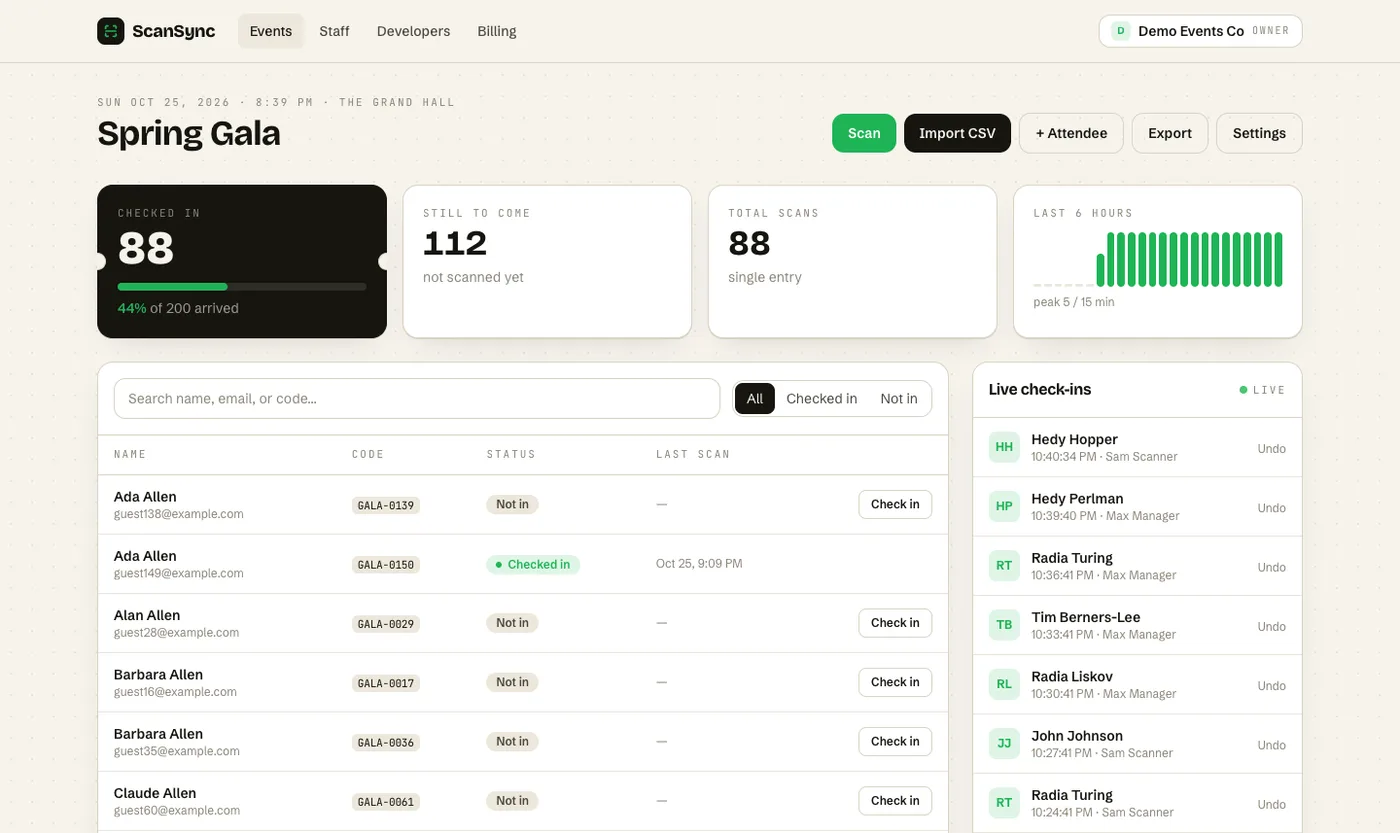 The live dashboard shows arrivals as they happen.
Day after: wrap-up
- [ ] Thank attendees, speakers, sponsors, staff, and volunteers
- [ ] Send a short feedback survey
- [ ] Export attendance data and compare it with registrations
- [ ] Pay suppliers and reconcile the final budget
- [ ] Delete or archive attendee data you no longer need
- [ ] Hold a review meeting within a week
- [ ] Write up results against your goals (see post-event attendance reports)
- [ ] Save templates and notes for next time
Summary
A good event planning checklist turns a big project into small, dated tasks with clear owners. Lock in the foundations three to six months out, book suppliers around two months out, and use the final month for promotion, risk planning, and detail. The last two weeks are about final numbers, the run of show, and testing check-in. Afterwards, wrap up within a week so your data and lessons are ready for next time.
Next steps
When you reach the check-in items, ScanSync can import your attendee list, generate QR codes for anyone without one, and show live arrivals on web and phone. You can create a free account to test it ahead of your event, or see pricing for larger lists.
Frequently asked questions
What should be on an event planning checklist? +
At minimum: goals, budget, date, venue, suppliers, program, promotion and registration, communications, risk planning, day-of logistics, and follow-up. Organizing these by timeline makes it clear what to do and when.
How far in advance should I start planning an event? +
As a rule of thumb, start three to six months ahead for conferences, large parties, or anything with a popular venue. Small internal events can often be planned in four to eight weeks.
What should I do the day before an event? +
Confirm suppliers and arrival times, charge every device, prepare signage and printouts, test check-in with real tickets, and brief the team on the run of show and emergency procedures.
Check people in the simple way
Upload your list, scan at the door, and watch arrivals live. Free for your first event.