Real-Time Attendance Tracking: What a Live Dashboard Tells You
ScanSync Team · · 6 min read
Real-time attendance tracking turns each ticket scan into a number you can act on while the event is still happening. Instead of finding out afterward that half the room arrived in the last ten minutes, you can see the rush building and respond. This guide explains what a live check-in dashboard shows, how to read each number, and the specific decisions it can drive, such as opening another lane, delaying the start, or telling catering to hold the second round.
What a live check-in dashboard shows
Most live dashboards are built from the same handful of numbers. Each one answers a different question.
| Number | Question it answers |
|---|---|
| Checked in | How many people are inside right now (or have entered at least once)? |
| Still to come | How many registered people haven't arrived yet? |
| % arrived | What share of the expected crowd is here? |
| Total scans | How much scanning activity has there been, including re-entries and repeats? |
| Check-ins over time | How fast are people arriving, and is it speeding up or slowing down? |
| Recent check-ins | Who just came in, and was anything scanned by mistake? |
The total count is the number people look at first, but the rate over time is usually the most useful one during doors. A count of 300 tells you very little on its own. A count of 300 with the last 15 minutes much busier than the 15 before tells you a rush is on.
Reading the arrival rate
Arrival patterns tend to follow a curve: a slow start, a peak shortly before the advertised start time, then a tail of latecomers. The shape varies by event type, and the best guide is your own data from past events.
A useful way to reason about queues comes from Little's law, a result from queueing theory: the average number of people waiting equals the arrival rate multiplied by the average time each person spends waiting. You don't need to calculate it precisely. The practical lesson is that if arrivals increase and your scanning capacity doesn't, waiting time goes up quickly.
Worked example: suppose one scanner takes about 6 seconds per person, including a quick hello. That's roughly 10 people per minute, or 150 per 15 minutes. If your dashboard shows 250 check-ins in the last 15-minute block with two lanes open, each lane is handling about 125, which is close to capacity. If the next block looks busier, it's time to add a lane. These numbers are illustrative; time a few scans at your own door to get a real figure.
Decisions a live dashboard can drive
The value of real-time attendance tracking comes from deciding in advance what each signal should trigger. Here are common ones.
Open another lane
Signal: the arrival rate is climbing and the visible queue is growing. Action: move a roaming staff member to the door, or open a second entrance. Phones make this easy, since any staff member with the app can become a scanner in seconds. For more on lane design, see our guide on tactics for shorter entry lines.
Delay the start
Signal: "still to come" is high close to start time, and the arrival rate is still strong. Action: hold the opening by a few minutes so the room isn't half empty for the first speaker, and announce it. If the rate has already dropped off, the remaining people may simply not be coming, and waiting won't help.
Adjust catering
Signal: % arrived is well below what catering was ordered for. Action: tell the caterer to hold back a portion of the food, stagger service, or redirect it to a later break. The reverse also applies: if walk-ins push numbers up, catering needs to know early.
Move staff and rooms
Signal: arrivals have slowed to a trickle. Action: release door staff to other jobs, close a lane, or reassign volunteers to session rooms. For larger events, the event check-in staffing guide covers how to plan these shifts.
Catch problems early
Signal: the recent check-ins feed shows an unexpected name, a duplicate, or a scan at the wrong event. Action: undo the scan right away instead of fixing it in the report later.
Using filters and segments
Totals are a start, but you can often make better decisions with a segment. If you've imported custom fields such as Ticket Type, Table, or Session, filtering the attendee list helps answer questions like:
- Have all the VIPs arrived before the reception starts?
- Is one table mostly empty, so seating can be adjusted?
- Which speakers or sponsors haven't checked in yet?
Our guide to VIP lanes and badge pickup with custom fields shows how to set these fields up before the event.
Who should be watching
A dashboard only helps if the person who can act on it is looking at it. Consider sharing it with:
- The door lead, who decides on lanes and staff moves
- The event lead or producer, who decides on start times
- Catering or venue contacts, who adjust food and room setup
- Hosts at galas or receptions, who want to greet specific guests
Agree in advance on simple thresholds, such as "if more than X people are still to come at start time, we wait five minutes." That turns live data into a quick decision instead of a debate.
Real-time attendance tracking in ScanSync
ScanSync's live dashboard is available on the web and in the iPhone app. It shows checked in, still to come, % arrived, total scans, and a chart of check-ins per 15 minutes over the last 6 hours. A recent check-ins feed lets managers undo a scan with one tap.
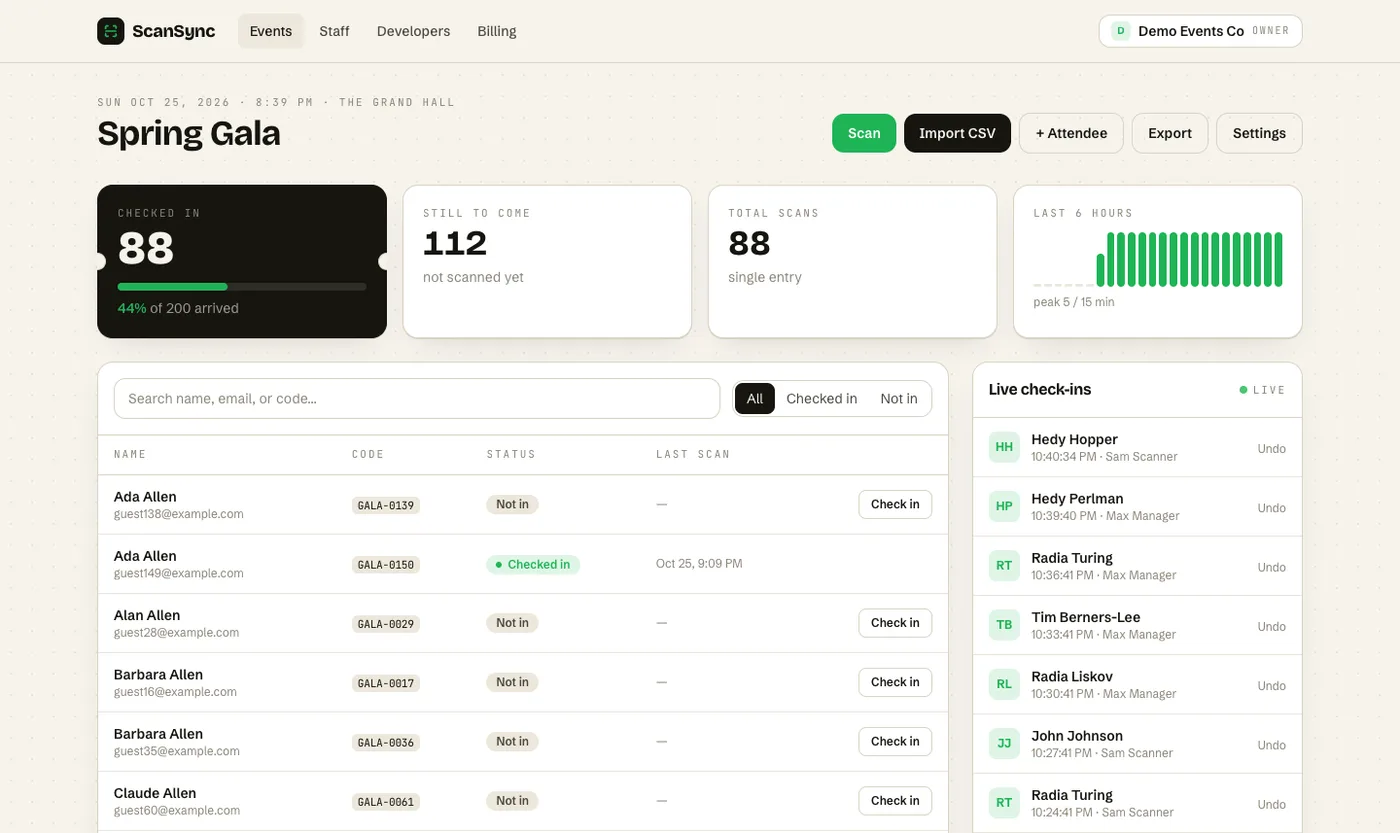 The live dashboard updates on every open screen as people arrive, with no refresh needed.
Every open screen updates live as scans come in, so the door lead's phone and the producer's laptop show the same numbers. You can filter the attendee table by check-in status and by any custom field, and after the event you can export a CSV of attendees with their check-in counts and times. That export is a good starting point for your post-event attendance report and for measuring and reducing no-shows next time.
Summary
Real-time attendance tracking is most valuable when each number is tied to a decision. Watch the arrival rate, not just the total, to judge whether lanes are keeping up. Compare "still to come" with the time left to decide whether a short delay makes sense, and share the numbers with catering and venue staff so they can adjust early. Filters by ticket type or table help with seating and VIP decisions, and a post-event export closes the loop.
Next steps
Before your next event, write down three simple rules, such as when to open a lane, when to delay, and when to call catering, and share them with your team. To see the dashboard with your own data, create a free account or read more about ScanSync features.
Frequently asked questions
What is real-time attendance tracking at an event? +
It means seeing check-in numbers update live as people are scanned at the door, instead of counting at the end. A typical dashboard shows arrivals, people still expected, and the rate of check-ins over time.
How do I know when to open another check-in lane? +
Watch the arrival rate and the queue together. If people are arriving faster than your current lanes can scan them for more than a few minutes, the line will keep growing, so open another lane or move a roaming scanner to the door.
Can more than one person watch the attendance dashboard at once? +
With most live dashboards, yes. It helps to have the event lead, the door lead, and whoever handles catering or room setup all looking at the same numbers.
Check people in the simple way
Upload your list, scan at the door, and watch arrivals live. Free for your first event.