How to Reduce Event No-Shows: Measure, Remind and Plan Ahead
ScanSync Team · · 6 min read
Every empty seat at an event costs something: catering ordered for nobody, a sponsor who expected a bigger room, or a waitlisted person who could have come. If you want to reduce event no-shows, the first step is not a clever reminder email; it's knowing your real numbers. This article covers how to define and measure a no-show rate from check-in data, the common reasons people don't come, how reminders and pricing affect attendance, and how to overbook carefully if you decide to.
What counts as a no-show
A no-show is someone who registered or bought a ticket and never arrived. That sounds obvious, but it gets fuzzy fast:
- Someone who cancelled a week before isn't a no-show; they freed up a place.
- Someone who transferred their ticket to a colleague isn't a no-show, even if the name doesn't match.
- Someone who arrived without being scanned looks like a no-show in the data, even though they were there.
That last point matters most. If your door process lets people slip in unscanned, your no-show figure will be too high and you'll overcorrect next time. A consistent check-in process is the foundation; the complete guide to event check-in covers how to set one up.
How to measure your no-show rate
The formula is simple:
No-show rate = (Registered − Checked in) ÷ Registered
Here's a worked example. Say 400 people registered for a workshop day and 320 were checked in at the door. That's 80 no-shows, and 80 ÷ 400 = 20%.
A single overall number hides a lot, so break it down by segment. If you imported your guest list with a custom field like Ticket Type, you can filter by it and compare:
| Segment | Registered | Checked in | No-show rate |
|---|---|---|---|
| Paid | 250 | 230 | 8% |
| Free / comp | 150 | 90 | 40% |
| Total | 400 | 320 | 20% |
These figures are an illustrative example, not a benchmark.
In this example the overall rate looks manageable, but almost all of the problem sits in the free tickets. That changes what you'd do next.
The live dashboard shows checked in, still to come and percentage arrived as people come through the door, and you can export the attendee list as CSV with check-in counts and times afterwards. The guide to post-event attendance reports explains how to turn that export into a report you can compare across events.
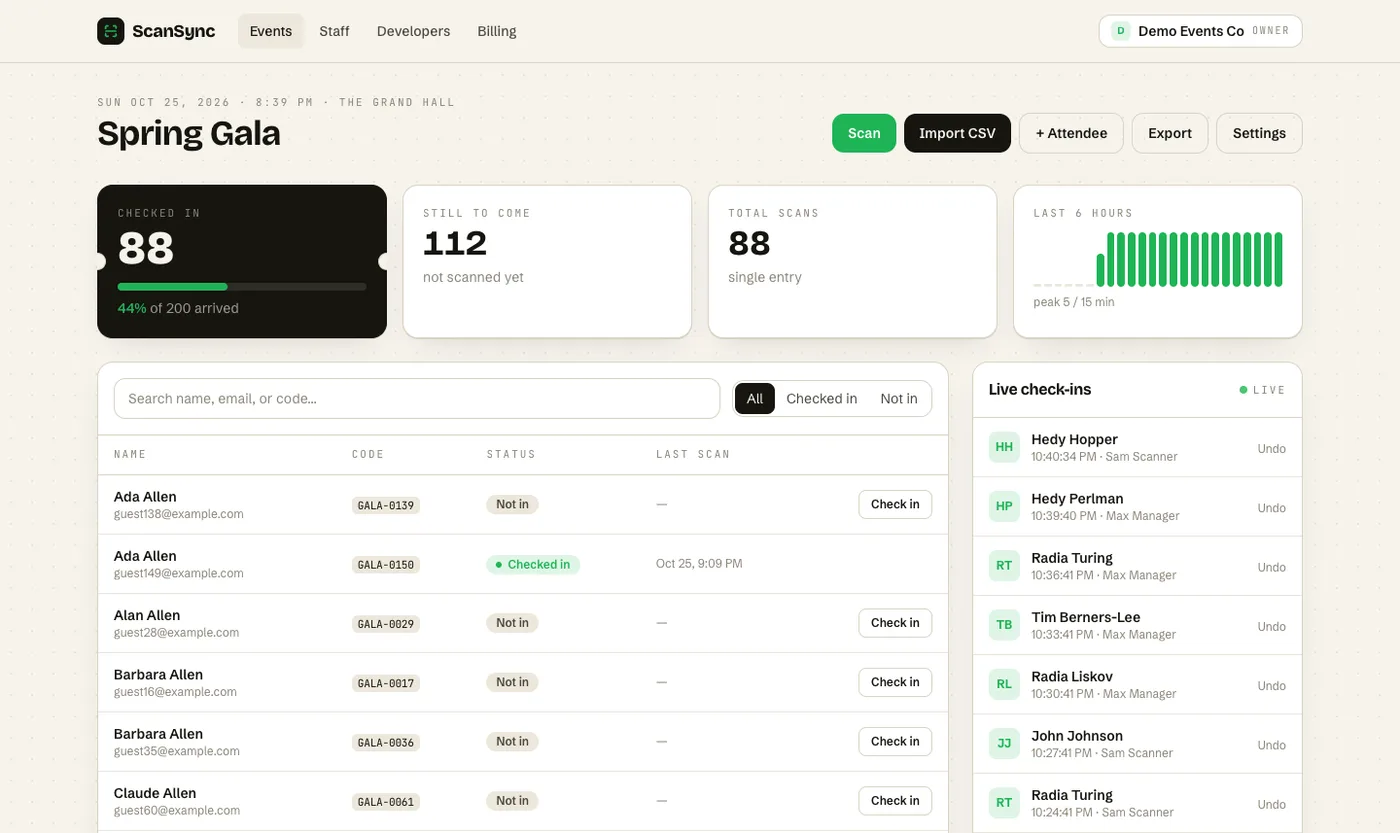 The "still to come" figure at the end of doors is your raw no-show count.
Why people don't come
Before trying to fix no-shows, it helps to understand the usual causes. They fall into a few groups:
- They forgot. The event was booked weeks ago and slipped off their calendar.
- Low commitment. Free registrations cost nothing to make and nothing to abandon.
- Friction on the day. Unclear location, no parking information, or a ticket buried in an old email.
- Something better came up. Weather, work, a clash with another event.
- They didn't realise they could cancel. So they didn't, and the place sat empty.
You can't control all of these, but forgetfulness, friction and the cancellation gap are very fixable. If you want to know which reasons apply to your audience, ask. A short, optional question to registered people who didn't attend ("What stopped you coming?") will tell you more than any general advice.
Reminders that actually help
A good reminder sequence is less about frequency and more about usefulness. A simple pattern:
- One week before: Confirm the date and time, and include a clear link to cancel or transfer.
- One or two days before: Practical details: address, entrance, parking or transit, what to bring, and the ticket code or QR code itself.
- Morning of (optional): A short note with the start time and doors time.
Put the ticket code in the reminder itself so nobody has to dig for the original confirmation. And make cancelling easy. A cancellation two days out is far better than a silent no-show, because it lets you release the place to a waitlist.
If you use ScanSync's API, you can pull check-in stats or use webhooks to trigger your own follow-ups. The overview of automating check-in with an API and webhooks shows what's possible.
Free vs paid events
Price is one of the strongest signals of commitment. Paid tickets, even cheap ones, tend to produce fewer no-shows than free ones, because people have put something in. That doesn't mean every free event should start charging; many events are free for good reasons. Some middle-ground options:
- A small refundable deposit, returned on attendance.
- A required confirmation step a few days before ("Reply to keep your place").
- A waitlist that is offered released places automatically.
- Limited free places with clear messaging that they are in demand.
Whatever you choose, measure the effect. Comparing no-show rates between two similar events, one with a change and one without, is the most honest way to know whether it worked.
Overbooking with care
Airlines overbook; events can too, but carefully. If your history shows a consistent no-show rate for a particular type of event, you can release a few more places than your seating allows. A worked example: if a 200-seat room has consistently seen around 15% of registered people not arrive, registering 220 would on average fill about 187 seats, leaving some margin.
Some rules for doing this safely:
- Use your own data, from several similar events, not a figure from elsewhere.
- Never exceed safe venue capacity. Fire and crowd limits are not something to gamble with. The UK HSE's event safety guidance is a useful general reference, and your venue will have its own limits.
- Overbook by segment. If free tickets drive the no-shows, overbook those, not paid ones.
- Have a plan for a full house, such as overflow seating, a livestream room or a polite "we're at capacity" message.
- Watch arrivals live. If the dashboard shows arrivals running ahead of normal, stop admitting overbooked walk-ins early.
Live numbers help here; see live attendance tracking for how to read the arrival curve as it happens.
Summary
To reduce event no-shows, start by measuring them accurately: registered versus checked in, broken down by segment. Most no-shows come from forgetfulness, low commitment and friction, which useful reminders, easy cancellation and clear day-of details can address. Free and paid events behave differently, so treat them separately. If you overbook, base it on your own history and stay well within safe capacity.
Next steps
If you want reliable check-in data to measure no-shows from, you can create a free account and run your next event with a scanned door list. When you're ready for more attendees or staff, see pricing for the plans.
Frequently asked questions
What is a normal no-show rate for events? +
There is no single normal figure; it varies widely by event type, price and audience. Free events usually see more no-shows than paid ones, so the most useful benchmark is your own history for similar events.
How do you calculate an event no-show rate? +
Subtract the number of people who checked in from the number registered, then divide by the number registered. For example, 400 registered and 320 checked in gives 80 no-shows, a 20% no-show rate.
Do reminder emails reduce no-shows? +
Reminders help many people who simply forgot or lost track of the details. They work best when they include the date, time, location, what to bring and an easy way to cancel so you can release the place.
Check people in the simple way
Upload your list, scan at the door, and watch arrivals live. Free for your first event.