Event Check-In API and Webhooks: A Plain-English Guide
ScanSync Team · · 6 min read
An event check-in API connects your door to the rest of your tools. Instead of exporting spreadsheets after every change, your registration system can send new attendees straight in, and your CRM or team chat can hear about arrivals the moment they happen. This guide explains APIs and webhooks in plain language first, then walks through practical automation flows, and finishes with the two technical ideas developers need to get right: signature verification and idempotency.
APIs and webhooks, in plain terms
Think of an API as a phone number your software can call to ask or tell the check-in system something. "Add this attendee." "Check in ticket ABC123." "How many people have arrived?" Most modern APIs follow the REST style, where each request goes to a URL and uses standard web methods.
A webhook is the reverse: the check-in system calls you. You give it a URL, and whenever something happens, such as an attendee checking in, it sends a short message to that URL with the details.
| API | Webhook | |
|---|---|---|
| Who starts it | Your system | The check-in system |
| When | Whenever you choose | As soon as something happens |
| Good for | Adding attendees, reading stats, checking in from another app | Reacting to check-ins, imports, and changes |
| Needs | An API key | A URL that can receive requests, plus a signing secret |
Most integrations use both: the API to push data in, webhooks to react to what happens at the door.
Why automate check-in at all?
Manual exports work fine for many events. Automation earns its place when:
- Registrations keep arriving right up to the event, and re-uploading files is becoming a chore
- Other teams need to know about arrivals as they happen, not the next day
- You run the same kind of event often and want the setup to be repeatable
- Check-in data feeds into another system, such as a CRM, a membership database, or a reporting tool
If you only run a few events a year, a CSV workflow may be all you need. Our guide to moving your list from a ticketing platform covers that approach.
Example flows
These are common patterns. Each one combines an API call, a webhook, or both.
1. Sync registrations as they happen
When someone registers on your website or form tool, your backend calls the check-in API to add or update that attendee. Using an "upsert" (update if they exist, create if they don't) means you can safely send the same person twice, for example after a name correction.
2. Update your CRM when someone arrives
Subscribe to the attendee.checked_in webhook. When it fires, your handler finds the contact in your CRM and marks them as attended, adds a note, or triggers a follow-up sequence. If a check-in is undone, a check_in.voided event lets you reverse the change.
3. Send team alerts for key arrivals
Your handler checks whether the attendee has a custom field like Ticket Type = VIP or Speaker. If so, it posts a short message to your team chat channel: "Speaker Jane Doe has arrived at the main entrance." Hosts can greet people without staring at a dashboard.
4. Print a badge on arrival
When a check-in webhook arrives, your handler sends the attendee's name and company to a badge printer queue at the desk. The guest walks up, gets scanned, and their badge is printing before they reach the table.
5. Feed reporting after the event
Use the stats endpoint, or collect webhook events throughout the day, to build attendance numbers in your own reporting tool. Our guide to post-event attendance reports covers which numbers are worth keeping.
What a webhook payload looks like
Here's an illustrative example of the kind of JSON a check-in webhook might send. Field names will differ between products, so always follow your provider's documentation.
{
  "id": "evt_01HZX7K2M9",
  "type": "attendee.checked_in",
  "created_at": "2026-10-26T18:42:05Z",
  "data": {
    "event_id": "evt_summit_2026",
    "attendee": {
      "code": "ABC123",
      "name": "Jane Doe",
      "custom_fields": { "Ticket Type": "Speaker" }
    },
    "check_in_count": 1
  }
}
The id at the top matters more than it looks. It's what lets you avoid processing the same delivery twice, as described below.
For developers: signatures, retries, and idempotency
Verifying signatures
Your webhook URL is public, so anyone could send a request to it. A signature proves the request came from the sender and wasn't modified.
Most providers use HMAC with SHA-256. The idea:
- You and the sender share a secret, set up when you create the webhook.
- The sender computes an HMAC of the raw request body using that secret and includes it in a header.
- Your server computes the same HMAC from the raw body it received.
- If the two values match, the request is genuine. If not, reject it.
Practical tips:
- Compute the HMAC over the raw body bytes, before any JSON parsing or reformatting.
- Use a constant-time comparison function to compare signatures.
- Keep the secret in environment variables or a secrets manager, never in code or client-side apps.
- If the provider includes a timestamp, reject requests that are too old to limit replay attacks.
Idempotency and retries
Networks fail. If your server is slow or returns an error, a webhook sender will typically retry, which means you may receive the same event more than once. Your handler should be idempotent: handling the same event twice should have the same result as handling it once.
A simple pattern:
- Store each event
idyou've processed. - When a webhook arrives, check whether you've seen that
id. - If yes, return a success response and do nothing else.
- If no, process it, record the
id, then return success.
Also respond quickly. Acknowledge the webhook, then do slow work such as CRM updates or printing in a background job.
The same thinking applies to offline scanning. When phones queue check-ins without a connection, each one needs a unique ID so it isn't counted twice when it syncs. Our guide to checking people in without Wi-Fi explains how that works at the door.
ScanSync's API and webhooks
ScanSync includes a REST API and signed webhooks on every plan, including Free:
- API keys, created by the account Owner, authenticate requests.
- API actions: add or upsert attendees, check someone in, and read stats.
- Webhook events:
attendee.checked_in,check_in.voided,attendee.created,attendee.updated, andimport.completed. - Signatures: every webhook is signed with HMAC-SHA256 so you can verify it came from ScanSync.
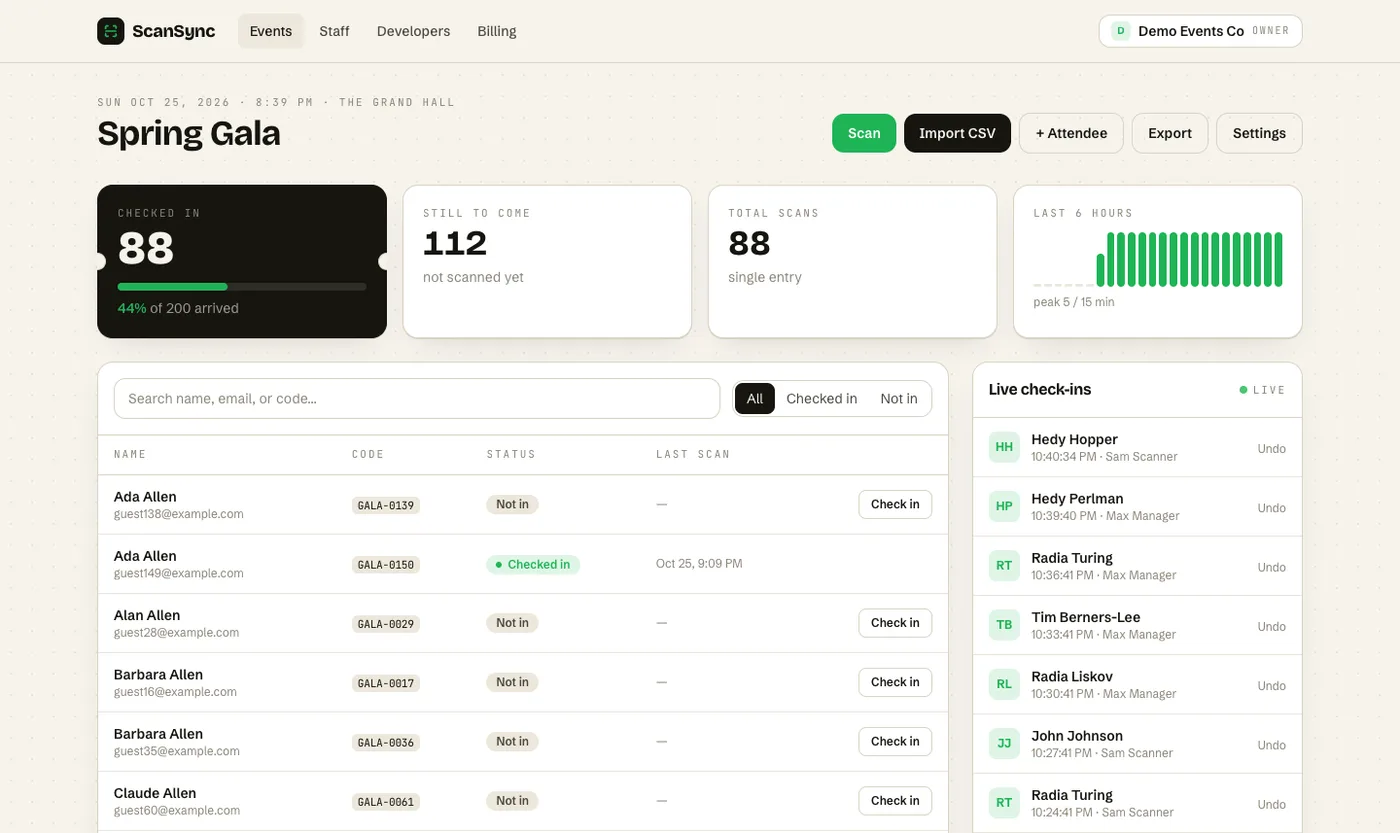 Check-ins appear on the live dashboard as they happen, and each one can trigger a webhook to your other systems.
Check-ins made through the API show up alongside scans from phones and the web app, so the live attendance dashboard stays the single view of who's here. If you're comparing tools, our guide to features that matter in a check-in app puts integrations in context.
Summary
An event check-in API lets your systems send attendees in and check people in programmatically, while webhooks notify your systems the moment something happens at the door. Together they support flows like syncing registrations, updating a CRM on arrival, sending team alerts, and printing badges. Developers should verify every webhook's HMAC signature against the raw body and make handlers idempotent so retries never cause duplicate actions. Start with one simple flow and add more once it's reliable.
Next steps
Pick the one manual step you repeat most, such as re-uploading registrations or telling the team when speakers arrive, and automate that first. You can read the developer overview or create a free account to generate an API key and try a test webhook.
Frequently asked questions
What is an event check-in API? +
It's a way for software to talk to your check-in system directly, without someone clicking buttons. Typical uses are adding or updating attendees, checking someone in, and reading attendance totals.
What's the difference between an API and a webhook? +
With an API, your system makes a request when it wants something. With a webhook, the check-in system sends a request to your URL when an event happens, such as an attendee checking in.
Why do webhooks have signatures? +
A signature lets you confirm that a webhook really came from the sender and wasn't changed on the way. Your server recomputes the signature with a shared secret and rejects the request if it doesn't match.
Check people in the simple way
Upload your list, scan at the door, and watch arrivals live. Free for your first event.