Event Attendee Data Privacy: GDPR Basics for Check-In
ScanSync Team · · 6 min read
Event attendee data privacy is easy to overlook when you're busy booking venues and printing badges, but a check-in list is a concentrated file of personal information: names, emails, phone numbers, sometimes dietary needs or accessibility requirements. This article walks through the general principles that make a check-in process more privacy-friendly: collecting less, having a reason for what you hold, limiting who sees it, and deleting it on time. It is general information, not legal advice. Rules vary by country and state, so check with a lawyer for anything specific to your organization.
Why check-in data deserves extra care
An attendee list is personal data in almost every privacy framework. At the door, it's also unusually exposed: it lives on several phones and laptops, it's handled by temporary staff and volunteers, and it's used in busy public spaces where screens can be seen over a shoulder.
Some fields carry more risk than others. A dietary note can hint at religion or health. An accessibility requirement may be health information. A home address is more sensitive than a first name. The more you hold, the more you have to protect.
Five principles for handling attendee data
Principle 1: collect and import only what you need
Data minimization is one of the core principles in GDPR (see Article 5), and it's good practice everywhere. For check-in, ask a simple question about each field: "Does someone at the door need this to let the right person in?"
A typical door needs:
- Name (to look people up)
- Ticket or barcode code (to scan)
- Ticket type or access level, if different people go to different places
- Number of allowed entries, for multi-day or re-entry events
Things the door often does not need: billing addresses, date of birth, job titles, how someone heard about you, or marketing preferences. If your ticketing platform exports 30 columns, you don't have to import them all. Our guide to moving your list from a ticketing platform explains how to trim an export before you upload it.
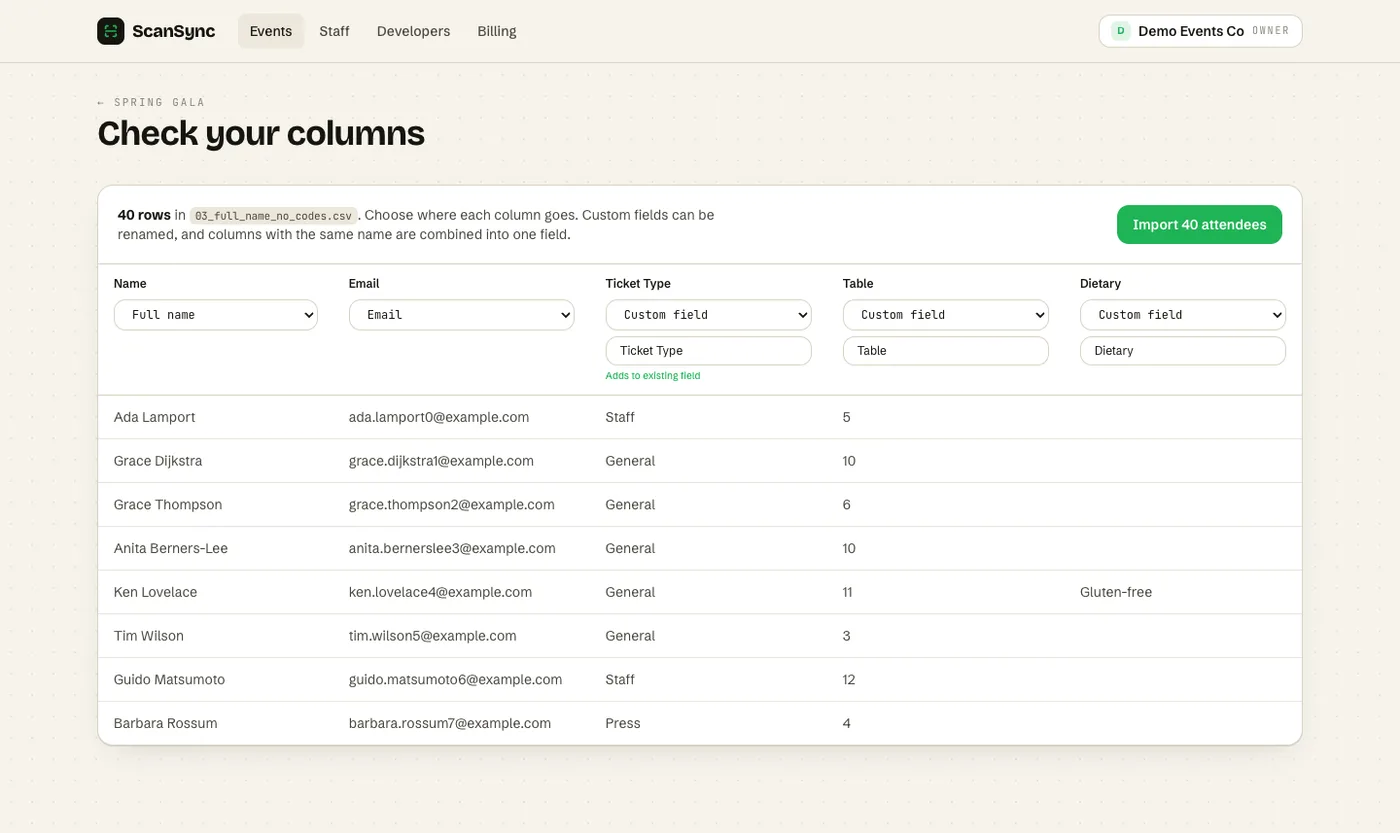 Map only the columns you need during import; anything you leave out never reaches the check-in system.
Principle 2: know your lawful basis
Under GDPR, you need a lawful basis to process personal data. Article 6 lists them, including consent, contract, legal obligation, and legitimate interests. For check-in, many organizers rely on the fact that the attendee bought or registered for a ticket, and checking them in is part of delivering that event. Other uses, such as sending marketing emails afterward, may need a different basis, often consent.
Practical steps:
- Write down why you collect each field and which basis applies.
- Tell attendees in your privacy notice what you collect for check-in and why.
- Don't reuse check-in data for unrelated purposes without checking that you're allowed to.
- If you're unsure which basis applies, ask a lawyer or your data protection lead before the event.
Principle 3: limit access by role
Not everyone on your team needs the same view of attendee data. A useful way to think about it:
| Role | Needs to | Should see |
|---|---|---|
| Door scanner | Scan tickets, find people by name | Name, code, status, ticket type |
| Event manager | Import lists, fix problems, undo scans | Full attendee records for their events |
| Account owner | Billing, staff access, integrations | Everything, across events |
Two extra habits help: give temporary staff access only to the events they're working, and remove access after the event. If a volunteer's phone is lost, you want it to hold as little as possible.
Principle 4: set retention rules and stick to them
Holding attendee data "just in case" is a risk with no clear benefit. Decide in advance:
- How long you need the full attendee list (for example, until refunds and disputes close)
- How long you need attendance numbers (often much longer, but they can be anonymous totals)
- Who is responsible for deleting the data, and when
A simple pattern is to keep aggregated numbers, such as how many people registered and how many arrived, and delete individual records once their purpose is served. Our guide to post-event attendance reports shows how to capture the useful numbers before you delete the detail.
Principle 5: treat exports as copies of the data
Every CSV export is a new copy of personal data that lives outside your check-in system, often in a downloads folder or an email attachment. Before you export:
- Ask whether you need individual records or only totals.
- Remove columns the recipient doesn't need.
- Share through a controlled location, not as an email attachment to a large list.
- Delete local copies when you're done.
If you regularly re-import updated lists, importing an attendee list from CSV without errors covers how to update records without creating duplicates, which also keeps the number of stray copies down.
A note on CCPA and other laws
GDPR is not the only framework. In California, the California Consumer Privacy Act gives residents rights over their personal information, and many other jurisdictions have their own laws. The details, including who is covered and what thresholds apply, differ. The principles in this article are a sensible baseline in most places, but they don't replace advice for your situation. Check with a lawyer for specifics.
How ScanSync supports privacy-friendly check-in
ScanSync was designed so the door team can do their job with as little data as possible:
- Choose what you import. During CSV import you map each column to a field, and you can skip the ones you don't need.
- Scanner role. Staff with the Scanner role can scan and look people up, and they never receive attendee emails, phone numbers, or addresses.
- Per-event access. Owners can give each staff member access to all events or only chosen events.
- Managers and Owners handle imports, undo, limits, and exports, so fewer people hold the full record.
- Controlled exports. CSV export includes attendees with their check-in counts and times, so you can pull what you need for reporting, then delete local copies.
You can read more in our privacy policy about how ScanSync handles data on its side.
Summary
Check-in lists are personal data, and they travel to more devices and people than most other event data. Collect and import only what the door needs, know your lawful basis for each use, and give scanning staff a limited view without contact details. Set a retention period before the event and treat every export as another copy to protect. This is general information, so confirm the specifics with a lawyer.
Next steps
Review your last attendee export and cross out every column the door didn't use; that's your minimal import for next time. If you'd like role-based access built in, you can create a free account and set up a Scanner role for your door team.
Frequently asked questions
Does GDPR apply to event check-in lists? +
If you process personal data of people in the EU or UK, or you are established there, GDPR or UK GDPR is likely to apply, and an attendee list with names and emails is personal data. A lawyer can confirm how it applies to your specific situation.
How long should I keep attendee data after an event? +
There is no single answer. Keep it only as long as you need it for a clear purpose, such as reporting, refunds, or follow-up the attendee agreed to, then delete it. Write that period down so it's applied consistently.
Should check-in volunteers see attendee contact details? +
Usually not. To scan a ticket or find someone by name, volunteers need very little information. Limiting what they can see reduces the risk if a device is lost or a screen is seen by someone else.
Check people in the simple way
Upload your list, scan at the door, and watch arrivals live. Free for your first event.