Event Check-In App: 10 Features That Actually Matter
ScanSync Team · · 6 min read
An event check-in app has one job: get the right people through the door quickly and keep an accurate count. Plenty of apps list dozens of features, but only a handful make a real difference when a queue is forming and the Wi-Fi is struggling. This article covers the 10 features that actually matter, why each one helps, and what to test before you commit.
At the door: speed and clarity
1. Fast scanning of the codes you already use
The core of any check-in app is how quickly it reads a ticket and shows a result. A delay of a second or two per guest adds up fast at a busy door.
Just as important is format support. If your tickets came from a ticketing platform, they may use linear barcodes like Code 128 rather than QR codes. Make sure the app reads your existing format so you don't have to reissue tickets. Our guide to QR codes vs barcodes for tickets explains the difference.
2. A clear, unmistakable result
Door staff glance at a screen for half a second. The result needs to be obvious: a large colour-coded message, ideally with a vibration or sound, that says "OK", "Already checked in", or "Not found". Small text or a list that updates quietly leads to mistakes.
3. Name lookup for people without tickets
Some guests will always arrive with a dead phone or no ticket. Staff need to search by name, email, or another field and check that person in manually. Without a fast lookup, these guests block the queue.
Reliability: keeping the count right
4. Offline mode that syncs safely
Venues are notorious for weak signal: basements, concrete halls, crowded festivals. An app that stops working when the connection drops will stop your door with it.
Look for an app that keeps the attendee list on the device, lets staff keep scanning offline, and queues check-ins to send later. The sync should be safe, meaning a check-in sent twice is still only counted once. Read more in checking people in without Wi-Fi.
5. Duplicate protection and check-in limits
The app should stop the same ticket being used twice, unless you want it to. Single-entry events need a limit of one. Multi-day festivals or events with re-entry need more. The best setup lets you set a default per event and override it for individual guests, such as staff or VIPs. Our article on multi-day events and re-entry covers this in depth.
6. Undo and corrections
Mistakes happen: a staff member scans the wrong ticket, or checks in the wrong "J. Smith". An undo button and a way to reset an attendee keep your numbers accurate without editing data behind the scenes.
Data and control: before, during, and after
7. Easy CSV import with column matching
You'll almost always start from a spreadsheet. A good app matches your columns automatically, lets you keep extra columns as custom fields, and reports errors by line number. It should also generate codes for anyone who doesn't have one, and update people rather than duplicate them when you re-upload. See our guide on importing an attendee list from CSV without errors.
8. A live dashboard
Organisers need to know how many people have arrived and how many are still to come, without phoning the door. A live dashboard showing arrivals over time helps you decide when to start the programme, when to move staff, and whether a queue is building. See live attendance tracking.
9. Staff roles and privacy controls
Door volunteers don't need access to billing, imports, or attendees' phone numbers. Role-based access lets you give each person only what they need. This reduces the risk of accidental changes and supports good data protection practice, such as the principle of data minimisation. Our attendee data privacy and GDPR basics explains why this matters.
10. Export and integrations
After the event, you'll want a list of who attended and when. CSV export is the minimum. If you run events regularly, an API and webhooks let you send check-ins to your CRM or other systems automatically. See automating check-in with an API and webhooks.
Quick comparison checklist
Use this when trialling apps with your real list:
| Feature | Question to ask |
|---|---|
| Scanning | Does it read my existing ticket codes from a phone screen? |
| Result screen | Can staff tell the result at a glance? |
| Import | Does it match my columns and report errors clearly? |
| Offline | Can I scan with flight mode on, and does it sync without double-counting? |
| Limits | Can I set allowed check-ins per event and per person? |
| Lookup | Can I find someone by name in a few seconds? |
| Dashboard | Does it update live without refreshing? |
| Undo | Can a manager reverse a mistaken scan? |
| Roles | Can I hide personal details from door staff? |
| Export | Can I download attendance with check-in times? |
How ScanSync covers these
We built ScanSync around this list. The iPhone app scans with the camera, has a torch and a type-a-code box, and shows a big green, amber, or red result with vibration (Android is coming soon). The web app scans with USB or Bluetooth barcode scanners and with the camera in supported browsers. It reads QR, Code 128, PDF417, Aztec, Data Matrix, EAN, UPC, and other common formats.
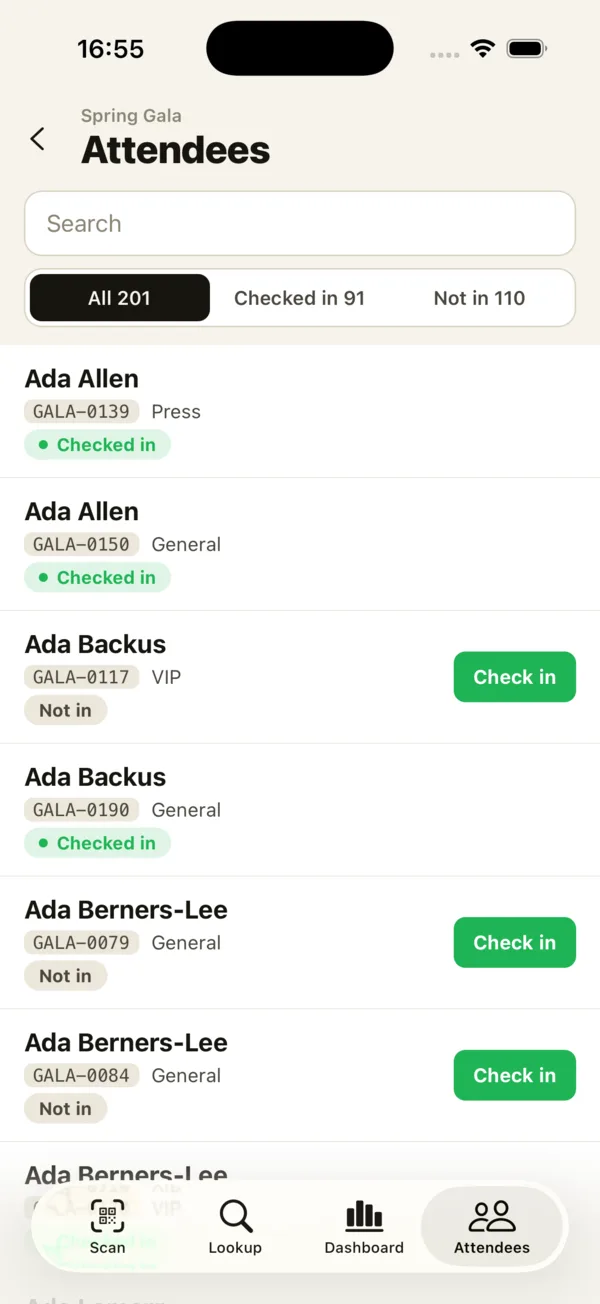 Staff can filter the attendee list and check people in manually from the phone.
CSV import matches columns automatically, and the phone app works offline with check-ins queued and sent later, each with a unique ID so nothing counts twice. You can set allowed check-ins per event and per attendee, undo scans, and watch a live dashboard on web and phone. Owner, Manager, and Scanner roles control access, and scanners never see attendee emails, phones, or addresses. A REST API and signed webhooks are available for developers. Every plan includes every feature; the differences are event, attendee, and staff limits. Read when free check-in software is enough if you're deciding on a plan.
Summary
The best event check-in app is the one that is fast, clear, and reliable at your door. Prioritise scanning your existing codes, a clear result screen, easy import, and offline mode that syncs safely. Duplicate protection, lookup, undo, and a live dashboard keep your count accurate, while roles and export handle the admin side. Test any app with your real list and devices before the event.
Next steps
The simplest way to judge an app is to try it. Create a free account, import a few test attendees, and scan them from your phone, or explore the full feature list. For the complete process, see our guide to checking in attendees at an event.
Frequently asked questions
What should I look for in an event check-in app? +
Look for fast scanning of the code types you use, an easy CSV import, offline support, duplicate-scan protection, name lookup, and a live attendance count. Staff permissions and data export are also important for larger teams.
Can I use a free event check-in app? +
Yes, for small events a free plan is often enough. Check the attendee and staff limits, and whether offline mode and export are included.
Do event check-in apps work without internet? +
Some do and some don't. Apps with offline mode store the attendee list on the device and sync check-ins once the connection returns, which is important in basements, stadiums, and rural venues.
Check people in the simple way
Upload your list, scan at the door, and watch arrivals live. Free for your first event.