Event Goals and KPIs: How to Set Targets and Measure Success
ScanSync Team · · 6 min read
Setting clear event goals and KPIs is what separates "that felt like a good event" from "that event did what we needed it to do." Goals tell your team what the event is for; key performance indicators (KPIs) tell you whether it worked. This guide shows you how to write SMART goals, choose the right KPIs for your type of event, set baselines and targets, collect reliable data during and after, and work out a simple return on investment.
If you're still shaping the event itself, start with our step-by-step guide to planning an event, then come back here before you set the budget.
Goals vs KPIs: why you need both
A goal is the result you want. A KPI is the number that tells you whether you're getting it. The difference matters because it's easy to measure what's convenient instead of what's important.
| Goal | Weak KPI | Better KPI |
|---|---|---|
| Strengthen relationships with existing customers | Number of registrations | Share of invited customers who attended |
| Generate sales pipeline | Number of booth visitors | Qualified leads followed up within a week |
| Raise money for a cause | Number of guests | Total donations and average gift per attendee |
| Improve staff engagement | Number of sessions | Post-event survey score on the key question |
A performance indicator is only useful if someone will act on it. For each KPI, ask: "If this number were bad, what would we do differently?" If there's no answer, drop it.
Write SMART goals
SMART criteria are a simple way to turn a vague aim into a goal you can measure. A SMART goal is:
- Specific - clear about what you want to achieve
- Measurable - tied to a number you can collect
- Achievable - realistic given your budget, team, and audience
- Relevant - connected to a wider business or organisational objective
- Time-bound - with a date by which it should be met
From vague to SMART
- Vague: "Get more people to our customer day."
- SMART: "Have at least 150 existing customers attend our customer day on 12 March, up from 110 last year, to support our retention goal."
Notice that the SMART version includes a baseline (last year), a target, a date, and a reason. That's what makes it useful in planning meetings.
Choose KPIs by event type
Different events exist for different reasons, so the KPIs should differ too. Pick three to five per event.
Conferences and summits
- Attendance rate (attendees ÷ registrations)
- Session attendance for key sessions
- Attendee satisfaction or Net Promoter Score
- Sponsor leads delivered
Corporate and internal events
- Attendance rate by team or office
- Post-event survey scores on the core message
- Follow-up actions completed
Our corporate event planning guide covers how to align these with business goals.
Trade shows and product launches
- Qualified leads captured
- Meetings booked
- Media or partner attendance
- Pipeline or sales attributed within a set period
Fundraisers and galas
- Total raised and net revenue after costs
- Average gift per attendee
- Attendance rate among confirmed guests
Useful KPIs for almost any event
- Attendance rate and no-show rate. These show how well your invitations and reminders worked. See how to reduce event no-shows.
- Arrival curve. When people actually arrived tells you whether the doors-open time and staffing were right.
- Net Promoter Score. A single "how likely are you to recommend" question gives a simple, comparable satisfaction measure.
- Cost per attendee. Total cost divided by people who actually attended, not people who registered.
Set baselines and targets
A target without a baseline is a guess. Use your last comparable event as the starting point. If this is your first event, set modest targets, collect clean data, and treat this event as the baseline for the next.
Here's an example KPI table for a 300-registration customer conference. All targets and baselines are illustrative, to show the format.
| KPI | How it's measured | Baseline (last event) | Example target |
|---|---|---|---|
| Attendance rate | Check-ins ÷ registrations | 68% | 75% |
| Arrived before keynote | Check-ins before start time ÷ total check-ins | 80% | 90% |
| Net Promoter Score | Post-event survey | +30 | +40 |
| Qualified leads | Sales team CRM | 40 | 55 |
| Cost per attendee | Total cost ÷ attendees | $210 | $190 |
Agree on the targets with stakeholders before the event, not after, so the conversation afterwards is about what happened rather than what "good" meant.
Measure during and after the event
During the event
Some KPIs can guide decisions in real time. A live check-in count shows whether attendance is on track and whether you should hold the start for a few minutes. Arrivals per 15 minutes reveal whether your entrance is keeping up.
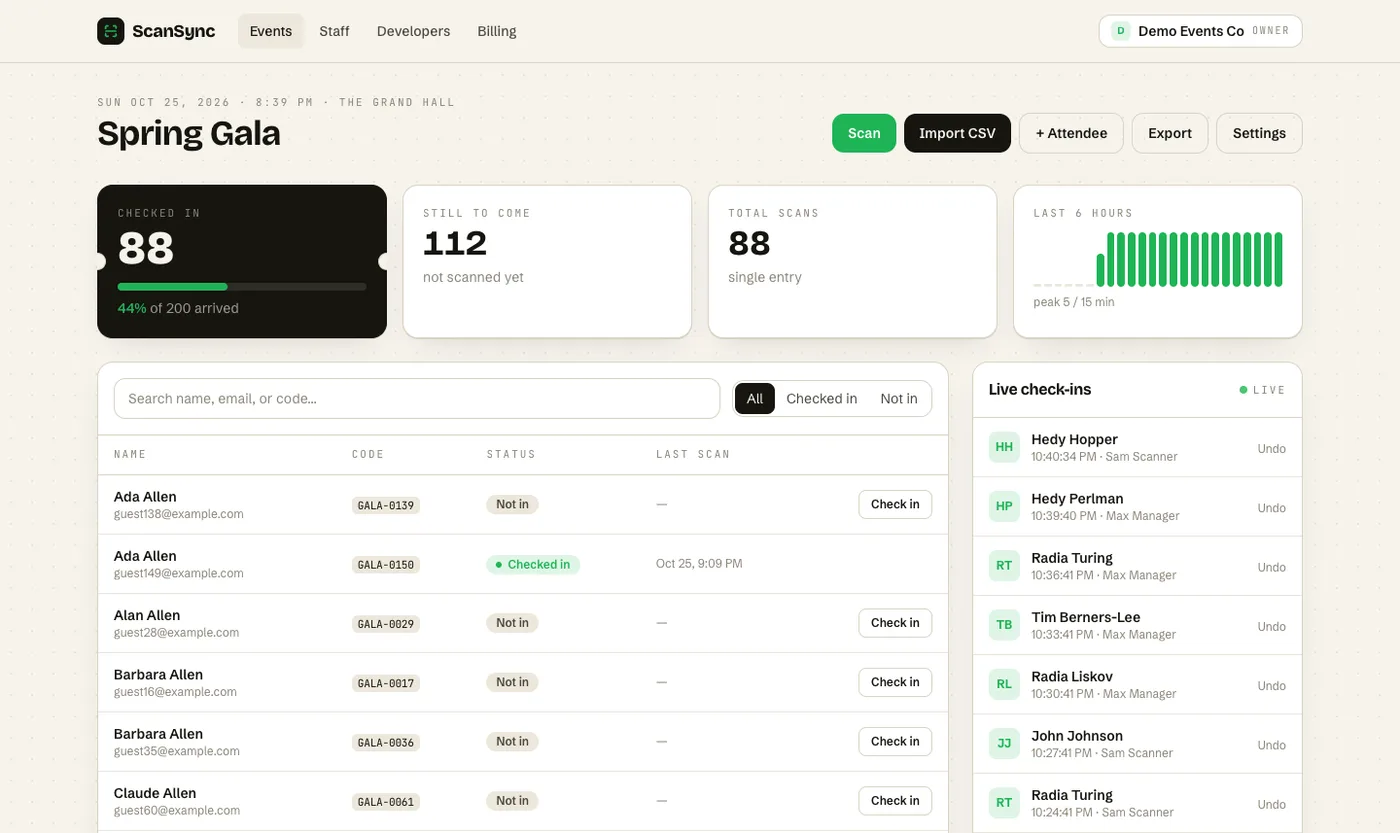 The live dashboard shows arrivals as they happen, in 15-minute intervals.
With ScanSync, the dashboard shows checked in, still to come, percent arrived, and check-ins per 15 minutes, on the web and on the iPhone app. Our guide to real-time attendance tracking explains what to look for.
After the event
Collect everything within a week, while it's fresh:
- Attendance data. Export check-ins to CSV and compare with registrations. Check-in data is objective: it records who scanned in and when, rather than relying on estimates. Our post-event attendance report guide walks through the analysis.
- Survey results. Send the survey within a day or two; responses tend to drop off as time passes.
- Commercial results. Leads, sales, or donations from your CRM or finance team.
- Costs. Final invoices against your event budget.
Write a one-page results summary comparing each KPI with its target, and note what you'd change next time.
ROI basics
Return on investment compares what the event produced with what it cost.
ROI = (value generated − total cost) ÷ total cost × 100
Worked example: an event costs $20,000 in total. The sales team attributes $50,000 of new business to it within three months. ROI = ($50,000 − $20,000) ÷ $20,000 × 100 = 150%.
A few cautions:
- Agree how value is attributed before the event. Otherwise, ROI turns into a debate.
- Include all costs, including staff time and travel if your organisation counts them.
- Not every event has a cash return. For internal or community events, use non-financial KPIs like attendance rate and survey scores, and report cost per attendee instead.
Summary
Event goals and KPIs give your planning a clear direction and your results a clear verdict. Write each goal in SMART form, then choose three to five KPIs that genuinely reflect it, matched to your event type. Set targets against a baseline, use objective data like check-in records alongside surveys and sales figures, and summarise results within a week. Where it makes sense, calculate ROI using costs and attribution rules agreed in advance.
Next steps
Pick your KPIs now and add the measurement tasks to your event planning checklist. If attendance is one of them, you can create a free account to scan guests in and export accurate check-in data, or see pricing for larger events.
Frequently asked questions
What is the difference between an event goal and a KPI? +
A goal is the outcome you want, such as growing your customer community. A KPI is a measurable number that shows whether you are getting there, such as the share of registered customers who actually attend.
What are the most common event KPIs? +
Common ones include registrations, attendance rate, no-show rate, attendee satisfaction or Net Promoter Score, leads or sales generated, cost per attendee, and revenue. The right mix depends on why you are running the event.
How do I measure event attendance accurately? +
Use check-in data rather than registrations or headcounts by eye. Scanning each attendee on arrival gives you an exact count, arrival times, and a list of who attended, which you can export and compare with your registration list.
Check people in the simple way
Upload your list, scan at the door, and watch arrivals live. Free for your first event.