Free Event Check-In Software: What You Get and When to Upgrade
ScanSync Team · · 5 min read
If you're running a small event, paying for software can feel unnecessary, and often it is. Free event check-in software can handle a surprising amount, from importing your guest list to scanning tickets on a phone. The catch is that every free plan has limits, and the ones that matter aren't always the ones in the headline. This guide covers what to expect from free tools, which limits actually affect you, when paper lists and spreadsheets stop working, and when upgrading makes sense.
The three ways to check people in for free
Before comparing tools, it helps to be clear about the options.
| Method | Good for | Where it breaks |
|---|---|---|
| Paper list and pen | One door, one person, a few dozen guests | Finding names fast, multiple doors, any reporting |
| Shared spreadsheet | One or two people, known guest list | Simultaneous edits, poor Wi-Fi, no duplicate warning |
| Free check-in app | Scanning tickets, several staff, live counts | Usage caps on attendees, events or staff |
None of these is wrong. A book club meeting doesn't need scanning; a 90-person launch with two volunteers at the door probably benefits from it. If you're new to the topic, the complete guide to event check-in explains the basics behind each approach.
When paper lists and spreadsheets break down
Paper and spreadsheets are free and familiar, which is why they're so common. They tend to fail in predictable ways:
- More than one door. Two clipboards mean two lists, and nobody knows who came in through the other entrance.
- More than one person editing. In a shared spreadsheet, two people marking rows at once can overwrite each other or mark the wrong row.
- No duplicate warning. A forwarded ticket or screenshot can be used twice and nobody notices until later, if ever.
- Weak Wi-Fi. Cloud spreadsheets slow down or stop syncing exactly when the queue is longest.
- Slow lookups. Scrolling a list for "Smith" while ten people wait is the main cause of queues at small events.
- No useful record. Afterwards, it's hard to say who came and when without retyping everything.
If none of these apply to you, a spreadsheet may be fine. If two or more do, a dedicated tool will usually save time on the day.
What to expect from a free check-in app
Free plans vary, but a decent one should cover the basics:
- Import from CSV, so you don't retype your list. A standard comma-separated values export from your registration form or ticketing platform should be enough.
- Scan the codes you already have. If your tickets already carry a QR code or barcode, those should keep working.
- Look up by name for people who arrive without their ticket.
- Duplicate detection, so a second scan shows clearly as already used.
- Live count of who has arrived.
- Some resilience to bad connections.
Some free plans remove features, such as exports, multi-device scanning or offline mode, rather than capping usage. That can be fine if you don't need them, but check before the day. The rundown of features that matter in a check-in app is a useful checklist.
The limits that actually matter
When you compare free plans, look past the feature list to the caps. For most events, three limits decide whether a free plan works:
Attendees per event
This is the most common cap. Count your full registered list, not expected turnout, because the whole list needs to be imported for lookups to work.
Staff seats
Every person scanning usually needs their own login. If you have two doors and a manager watching numbers, that's already three people.
Active events
Some plans allow only one event at a time. That's fine for a one-off, but awkward if you run a weekly series or have overlapping events.
As a concrete example, ScanSync's free plan includes 1 active event, up to 100 attendees per event and 2 staff seats. Every feature is included on every plan, so the free plan has the same scanning, offline mode, dashboard and CSV export as the paid ones; only the limits differ.
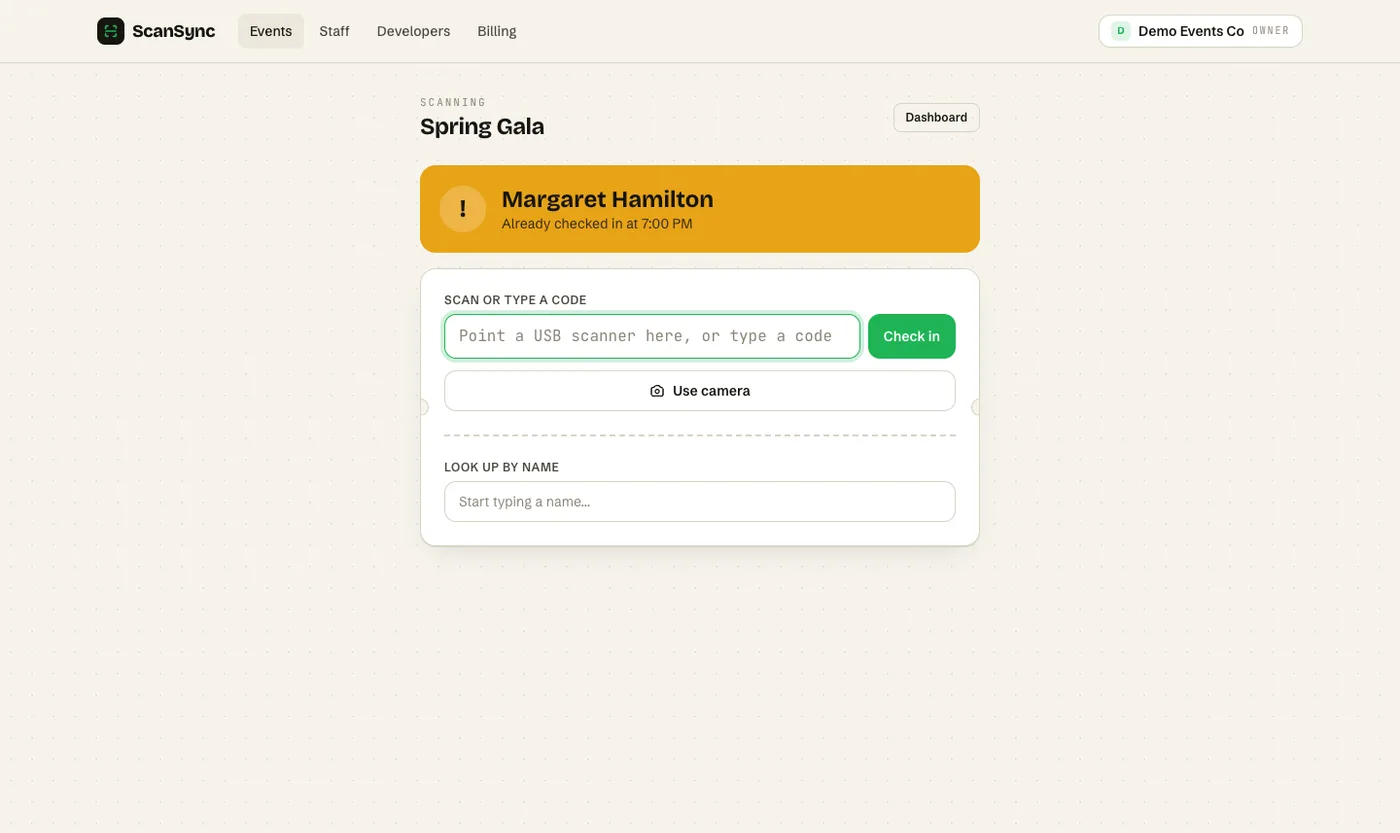 The free plan uses the same scanner as paid plans, including the duplicate warning.
A quick checklist before you commit
Run through this list with your actual event in mind:
- How many people are on the registered list?
- How many people will check guests in at the same time?
- How many events will be live at once?
- Do your tickets already have codes, or do you need them generated?
- Is the venue Wi-Fi reliable, or should check-in work without Wi-Fi?
- Do you need an attendance list afterwards?
If your answers fit within a free plan's limits, use it. There's no prize for paying for capacity you don't need.
When to upgrade
Upgrading makes sense when your event actually outgrows the free limits, not because of a feature you might use one day. Clear signals:
- Your list is bigger than the attendee cap, or will be once late registrations come in.
- You need more people scanning at the same time than the staff seats allow.
- You run several events in parallel, such as a series or multiple venues.
- Check-in is now a regular part of your work, and the cost is small compared to the staff time it saves.
With ScanSync, Pro is $49/month for 10 active events, 5,000 attendees per event and 15 staff seats, and Business is $199/month with unlimited events, attendees and staff, plus priority support. If your needs are small and occasional, you may stay on free indefinitely, and that's a perfectly reasonable outcome. For more on running a lean door team, see how many people you need at the door.
Summary
Free event check-in software is often enough for small, single events, and it's a big step up from paper or a shared spreadsheet once you have more than one door or more than one person checking guests in. The limits that matter most are attendees per event, staff seats and active events. Check those against your real numbers before the day, and upgrade only when your event genuinely outgrows them.
Next steps
If your event fits within 100 attendees and 2 staff, you can create a free account and import your list today. If you're planning something bigger, see pricing to compare plans.
Frequently asked questions
Is there free event check-in software? +
Yes. Several check-in tools offer free plans, usually capped by number of attendees, events or staff. ScanSync's free plan covers one active event with up to 100 attendees and 2 staff seats, with every feature included.
Can I check in guests with a spreadsheet instead? +
For a small event with one person at the door, a spreadsheet can work. It becomes risky when several people edit it at once, when the connection drops, or when you need to know instantly whether a ticket has already been used.
What should I look for in free check-in software? +
Check the attendee and staff limits first, then whether it can import your existing list, scan the codes you already have, and work if the Wi-Fi drops. A free plan that is missing one of those basics will cost you time on the day.
Check people in the simple way
Upload your list, scan at the door, and watch arrivals live. Free for your first event.