Gala Check-In: A Warm Welcome for Every Guest and Sponsor
ScanSync Team · · 5 min read
Gala check-in sets the tone for the whole evening. Guests have dressed up, sponsors expect to be recognized, and your team has a lot to hand out: table cards, auction paddles, and sometimes a glass of something sparkling. In this guide you will learn how to build a guest list that answers the questions people ask at the door, handle plus-ones and table assignments, greet sponsors properly, and keep a warm, personal welcome without a line forming in the lobby.
What makes gala check-in different
A conference or a concert door is mostly about speed. A gala door is about speed and hospitality. In a short exchange, your team often needs to:
- Confirm the guest and any plus-one.
- Tell them their table number.
- Hand over an auction paddle or bidding number.
- Note or confirm dietary needs for the catering team.
- Spot sponsors, honorees, and major donors so the right person greets them.
That is a lot to ask from memory or from a printed list. The answer is to put every one of those details into the guest list itself, so whoever is at the door can see them instantly.
Build a guest list that does the work
Start with a spreadsheet and give each guest a row. Useful columns for a gala:
| Column | Example | Why it matters |
|---|---|---|
| Full name | Jordan Lee | Lookup and greeting |
| [email protected] | Sending the code ahead | |
| Ticket code | Leave blank if you need one generated | Fast scanning |
| Table | 12 | Told to guest on arrival |
| Paddle | 147 | Handed out at the door |
| Guest type | Sponsor, VIP, Honoree, Guest | Who gets a personal greeting |
| Dietary | Vegetarian, nut allergy | Passed to catering |
| Host | Name of the person who invited them | Linking plus-ones |
If your list started in a ticketing platform or a donor database, export it to CSV and tidy it before importing. Our guide on importing an attendee list from CSV covers matching columns and avoiding duplicates.
Plus-ones: two good options
Plus-ones cause more door confusion than anything else at a gala. Pick one approach and stick to it.
Option 1: every guest gets a row. If you know the plus-one's name, add them as their own attendee with their own code, table, and paddle (or no paddle if only the host bids). This is the cleanest option for seating and for your attendance numbers.
Option 2: the host's record covers both. If plus-ones are unnamed, let the host's record be checked in twice and add a column like "Party size: 2." The door team checks the host in, then scans again when the guest arrives, even if they come separately.
Either way, tell guests before the event which name the booking is under. It saves an awkward search at the door.
Tables, paddles, and dietary notes
These details are what make a gala check-in feel personal. A greeter who can say "Welcome, Jordan, you are at table 12, and here is your paddle" makes a guest feel expected.
- Assign tables before you import. Late changes are fine, but the bulk should be in place.
- Pre-assign paddle numbers and lay paddles out in number order at the desk, so finding one takes seconds.
- Keep dietary notes accurate and share them with catering before the event, not just at the door. Remember these notes may count as sensitive personal information, so only collect what you need. Our post on attendee data privacy and GDPR basics has more, and for anything specific, check with a lawyer.
Greeting sponsors and VIPs
Sponsors underwrite the evening, and many fundraising events rely on that relationship continuing. Mark them in the guest type column, and assign a named host from your team to meet them. A simple approach is a separate VIP lane, covered in detail in VIP lanes and badge pickup with custom fields. When a sponsor is checked in, the door team gives the host a quick heads-up by radio or text, and the host comes to say hello.
Run the door
A smooth gala door usually has three positions:
- Welcome lane(s): scan codes or look up names, share table and paddle, and send guests to the reception.
- VIP lane or host: sponsors, honorees, and major donors, greeted by name.
- Help desk: name changes, walk-ins, lost codes, and seating questions, handled just out of the main flow.
Open doors early enough that guests can arrive over a comfortable window. For more ideas on keeping the lobby clear, see our tactics to reduce check-in lines.
How ScanSync supports gala check-in
ScanSync lets you import your guest list from CSV, with columns like name, email, and ticket code matched automatically. Columns such as Table, Paddle, Guest Type, and Dietary can be renamed into custom fields during import. Anyone without a code gets a QR code generated, so every guest can receive one by email beforehand. If you fix seating and upload the file again with the same codes, guests are updated rather than duplicated.
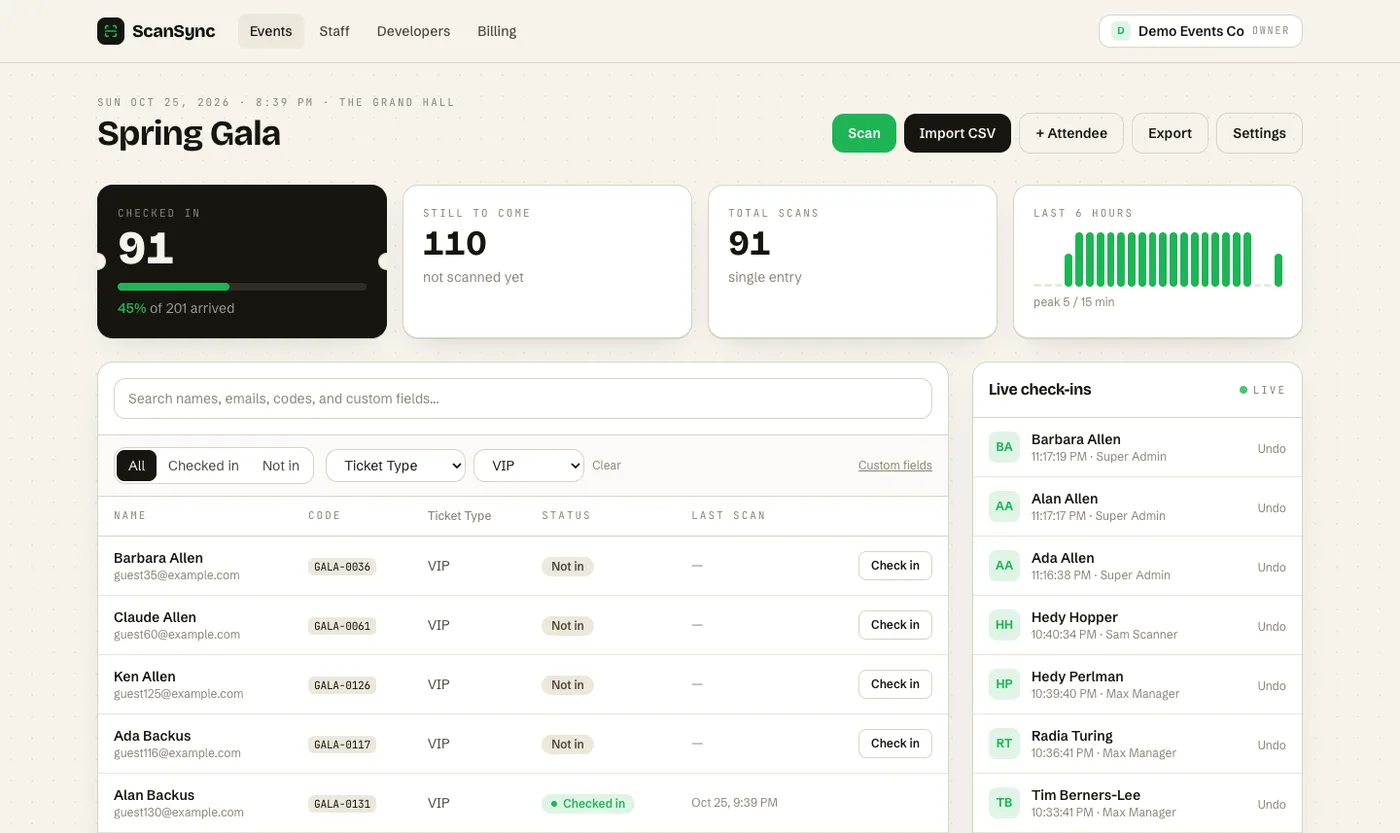 Filtering the attendee table by a custom field shows exactly which VIP guests have arrived.
On the night, your team can scan with the iPhone app or look guests up by name, email, code, or custom field values, so typing a paddle number or table works too. You can set allowed check-ins per attendee for unnamed plus-ones. The live dashboard filters by custom field, so your sponsor host can watch which VIPs have arrived. Scanner accounts never receive guest emails, phone numbers, or addresses, which is useful when volunteers staff the door. Afterward, export a CSV with check-in times for your post-event attendance report.
Summary
A great gala check-in combines speed with a personal touch. Put tables, paddles, guest types, and dietary notes into the guest list so the door team can see them at a glance. Choose one approach for plus-ones and tell guests about it in advance. Give sponsors a named host and a separate lane, and keep problems at a help desk so the welcome stays warm.
Next steps
Try a test run with a small slice of your guest list and a couple of volunteers. You can create a free account to set up custom fields and scanning, or contact us if you have questions about your event.
Frequently asked questions
How do you check in guests at a gala? +
Give each guest a QR code or a name on the list, scan or look them up at the door, and tell them their table and paddle number as you welcome them. Keep a separate desk for name changes and walk-ins.
How should I handle plus-ones on a gala guest list? +
If you know the plus-one's name, give them their own row and code. If you do not, allow the host's record to be checked in twice and note the guest count in a custom field.
What are paddle numbers at a fundraiser? +
Paddle numbers are the numbers guests hold up to bid during a live auction. Assigning them in advance and handing them out at check-in saves a separate registration step later in the evening.
Check people in the simple way
Upload your list, scan at the door, and watch arrivals live. Free for your first event.