QR Code vs Barcode Tickets: Which Should Your Event Use?
ScanSync Team · · 6 min read
When you plan ticketing, the question of QR code vs barcode tickets comes up quickly. Both are just ways of turning a ticket number into something a machine can read, but they behave differently on a bright phone screen, a crumpled printout, or a scanner at a busy door. This article explains how 1D and 2D codes differ, how each performs in real check-in conditions, which scanners read what, and what we recommend for most events.
1D vs 2D: what's the difference?
A traditional barcode is a one-dimensional (1D) code. It stores information in the widths of vertical bars and spaces, read in a single line from left to right. Common types on tickets and products include:
- Code 128: compact and able to store letters and numbers, widely used by ticketing systems
- Code 39 and Code 93: older alphanumeric formats
- EAN-13, EAN-8, UPC-A, UPC-E: the retail product barcodes you see on packaging
- ITF-14 and Codabar: used in logistics and some older systems
A two-dimensional (2D) code stores information in a grid of squares, read both horizontally and vertically. The best known is the QR code, but you will also see:
- PDF417: a stacked format often used on boarding passes and ID cards
- Aztec: common on transport tickets
- Data Matrix: small and dense, often used on parts and labels
For check-in, the main practical difference is that 2D codes can hold more data in less space and are designed to be read from any angle.
How each scans from phones and paper
Most tickets today are shown on a phone, but many guests still print them. Here is how the two types usually compare.
| Situation | 1D barcode | QR / 2D code |
|---|---|---|
| Phone screen, good brightness | Usually fine with a camera scanner | Usually fine |
| Phone screen, low brightness or glare | Can struggle, thin bars blur | More forgiving |
| Held at an angle | Needs to be roughly lined up | Reads from most angles |
| Printed on home printer | Fine if bars are crisp | Fine |
| Small on screen (zoomed out) | Thin bars become hard to read | Still readable at smaller sizes |
| Laser scanner | Supported | Not supported |
The reason phones favour QR codes is shape. A long, thin barcode has to fit across the screen, and if the guest's ticket app shrinks it, the narrowest bars can blur together. A square QR code uses the screen space more evenly.
What happens when codes are damaged
Paper tickets get folded, wet, and torn. Phone screens get cracked. This is where 2D codes have a real advantage.
QR codes, Aztec, Data Matrix, and PDF417 include error correction: extra data that lets a scanner rebuild the code even if part of it is missing or dirty. Depending on the level used when the code was created, a QR code can still scan with a noticeable chunk obscured.
Linear barcodes have only a simple check digit in many formats. A crease straight through the bars, or a smudge, can make the whole code unreadable. That doesn't mean barcodes are unreliable, just that they are less forgiving.
Practical tips for damaged codes
- Ask the guest to flatten the paper or increase their screen brightness.
- Move the scanner slightly further away; cameras often focus better at 15 to 25 cm.
- Use the torch in dim venues, but avoid shining it straight onto a glossy screen.
- If it still won't scan, type the code manually or look the guest up by name.
Which scanners read which codes
Not every scanner reads every format, so check before the event.
- Phone and tablet cameras with a check-in app: usually read both 1D and 2D codes. Some web browsers can also read codes with the camera through the Barcode Detection API, though support varies by browser.
- Laser handheld scanners: read 1D barcodes only, and often struggle with phone screens.
- 2D imaging scanners (USB or Bluetooth): read both, and work well with screens. Many act like a keyboard, typing the code and pressing Enter.
If you plan to use hardware scanners, our guide to using a phone as a ticket scanner explains when a phone is enough and when dedicated hardware helps.
Our recommendation
For most events, the choice is straightforward:
- Issuing new tickets? Use QR codes. They scan easily from phones, tolerate damage, and are what most guests expect.
- Already have barcodes from a ticketing platform? Keep them. Reissuing tickets confuses guests and creates support requests. Import the existing codes and make sure your scanner reads that format. See moving your list from a ticketing platform.
- Mixed list? That's fine too, as long as every code is unique and your scanner handles both types.
Whatever you choose, make sure each attendee has one unique code, and test a few real tickets on your actual devices before doors open. If you're bringing codes in from a spreadsheet, our guide to importing an attendee list from CSV shows how to keep the code column intact (spreadsheets sometimes strip leading zeros from numeric barcodes).
How ScanSync handles both
ScanSync reads QR, Code 128, Code 39, Code 93, EAN-13 and EAN-8, UPC-A and UPC-E, PDF417, Aztec, Data Matrix, ITF-14, and Codabar. When you import a list, any ticket codes already in your file are kept, so barcodes issued by another platform keep working. Anyone without a code gets a QR code generated automatically.
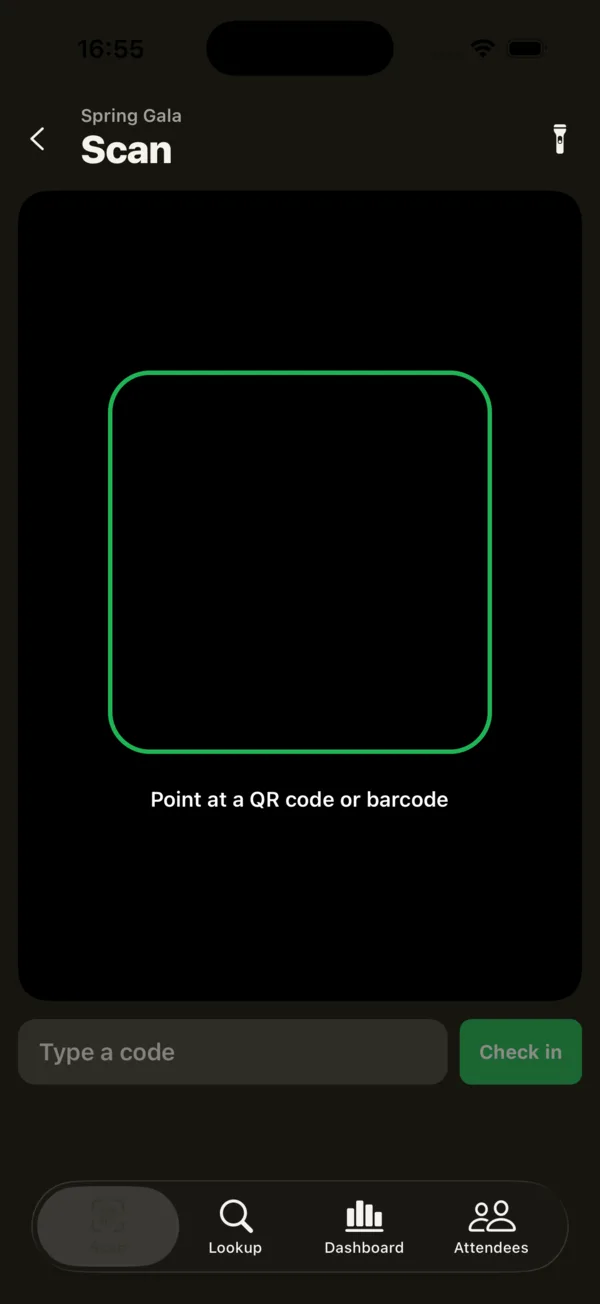 The iPhone scan tab reads codes with the camera, with a torch and a type-a-code box as backup.
You can scan with the iPhone app's camera, or in the web app with a USB or Bluetooth scanner or the device camera in browsers that support it. If a code won't read, staff can type it in or look the guest up by name. For a wider view of the whole process, see our complete guide to event check-in.
Summary
1D barcodes store a short code in bars, while 2D codes like QR store data in a grid with built-in error correction. QR codes generally scan more reliably from phone screens, at angles, and when partly damaged. Phone cameras read both, but basic laser scanners only read 1D barcodes. For new tickets choose QR codes; if you already have barcodes, keep them and confirm your scanners support the format.
Next steps
Want to check that your existing tickets scan? Create a free account, import a few rows with their codes, and scan them from your phone. You can also read more about ScanSync's features.
Frequently asked questions
Is a QR code better than a barcode for event tickets? +
For new tickets, QR codes are usually the better choice because they scan reliably from phone screens and tolerate some damage. Existing barcodes work fine if your scanners can read them, so there is rarely a need to reissue.
Can a phone camera scan a regular barcode? +
Yes. Most check-in apps use the phone camera to read both linear barcodes like Code 128 and 2D codes like QR. Very thin or low-contrast barcodes can be harder to read than QR codes.
Why won't my barcode scan from a phone screen? +
Common causes are low screen brightness, a cracked screen, glare, or using a laser scanner that can't read screens. Ask the guest to turn up brightness, try a camera-based scanner, or look them up by name.
Check people in the simple way
Upload your list, scan at the door, and watch arrivals live. Free for your first event.