Reduce Check-In Lines: 12 Practical Tactics for Faster Entry
ScanSync Team · · 6 min read
If you want to reduce check-in lines, it helps to know where they come from. Lines form when people arrive faster than you can process them, and they get worse when a single slow case blocks the lane. In this article you will find 12 practical tactics, grouped into what to do before the event, how to set up the entrance, and how to run the door on the day, plus how to tell whether they are working.
Why entry lines form
Queueing theory explains something every door lead has felt: when your scanners are almost fully busy, small delays snowball into long waits. That means you can shorten lines in three ways:
- Spread arrivals out so fewer people arrive per minute.
- Make each check-in faster so each lane handles more people.
- Remove blockers so a slow case does not hold up everyone behind it.
Every tactic below pulls one of those three levers. For the arithmetic behind lane counts, see our event check-in staffing guide.
Before the event: tactics 1 to 4
1. Stagger arrivals
If there is no reason to arrive early, everyone arrives at the start time. Open doors 30 to 60 minutes before the program and give people a reason to come: coffee, networking, or first pick of seats. For group bookings, schools, or shuttles, assign arrival windows.
2. Send every guest their code ahead of time
A guest with their QR code ready on their phone is a two-second scan. A guest who needs their name found in a list is a much longer conversation. Email codes a few days before and again on the morning of the event, and tell people to save or screenshot them.
3. Clean your attendee list before you import it
Duplicate rows, missing codes, and misspelled names all turn into slow lookups at the door. Spend 20 minutes on the list beforehand. Our guide to importing an attendee list from CSV walks through the common problems.
4. Tell people what to expect
A short "know before you go" message covering door times, what to bring, the entrance location, and accessibility options cuts down on questions at the front of the line.
At the entrance: tactics 5 to 8
5. Open more lanes than you think you need
Lanes are cheap compared with a frustrated crowd. If you are unsure, add one more scanner for the first 30 minutes and move them to another job once the rush passes.
6. Set up a separate lookup station
This is the tactic with the biggest payoff. Anyone without a code, with a name problem, or with an "already checked in" result is sent to a separate desk. The main lanes keep scanning while the lookup station solves problems at its own pace.
7. Use clear, early signage
Put signs where people join the line, not just at the desk. Useful signs say: "Have your QR code ready," "No code? Go to Help Desk," and, if you split lanes, which lane is for which group. Big, high-contrast text is easier for everyone to read.
8. Offer an accessibility lane
A clearly marked lane for people who use wheelchairs, have mobility needs, are pregnant, or need a quieter, slower interaction makes the entrance fairer and keeps the main line moving. Make sure the route is step-free and the desk height works for seated guests. The ADA website is a useful general reference if your event is in the US.
On the day: tactics 9 to 12
9. Walk the line
A greeter walking the line can remind people to open their codes, answer quick questions, and send problems to the lookup station before they reach the front.
10. Split lanes by group when it helps
VIPs, speakers, press, or badge pickup can each have their own lane so their extra steps do not slow general admission. Using custom fields to tag those groups is covered in our post on VIP lanes and badge pickup with custom fields.
11. Make results obvious to scanners
Scanners should not need to read small text to know what happened. Big color-coded results (green for valid, amber for already checked in, red for not found) let them keep eye contact and move on quickly.
12. Watch arrivals live and move staff
If you can see check-ins per 15 minutes and how many people are still to come, you can open a lane before the rush builds or move a scanner to the lookup desk when problems pile up. Our article on real-time attendance tracking explains what to watch.
Quick checklist
| Lever | Tactic | Done? |
|---|---|---|
| Spread arrivals | Doors open early, arrival windows for groups | ☐ |
| Faster scans | Codes sent twice, list cleaned | ☐ |
| Faster scans | Big, clear scan results | ☐ |
| Remove blockers | Lookup station staffed | ☐ |
| Remove blockers | Signs and greeter in the line | ☐ |
| Fairness | Accessible lane and route | ☐ |
How ScanSync helps
ScanSync supports most of these tactics without extra setup. When you import a CSV, anyone without a ticket code gets a QR code generated, so every guest can receive one before the event. If your guests already have barcodes from a ticketing platform, import those codes and they keep working.
Scanners using the iPhone app see a big green, amber, or red result with a vibration. Your lookup station can use the web app to search by name, and the web app also accepts USB or Bluetooth barcode scanners for a fixed desk.
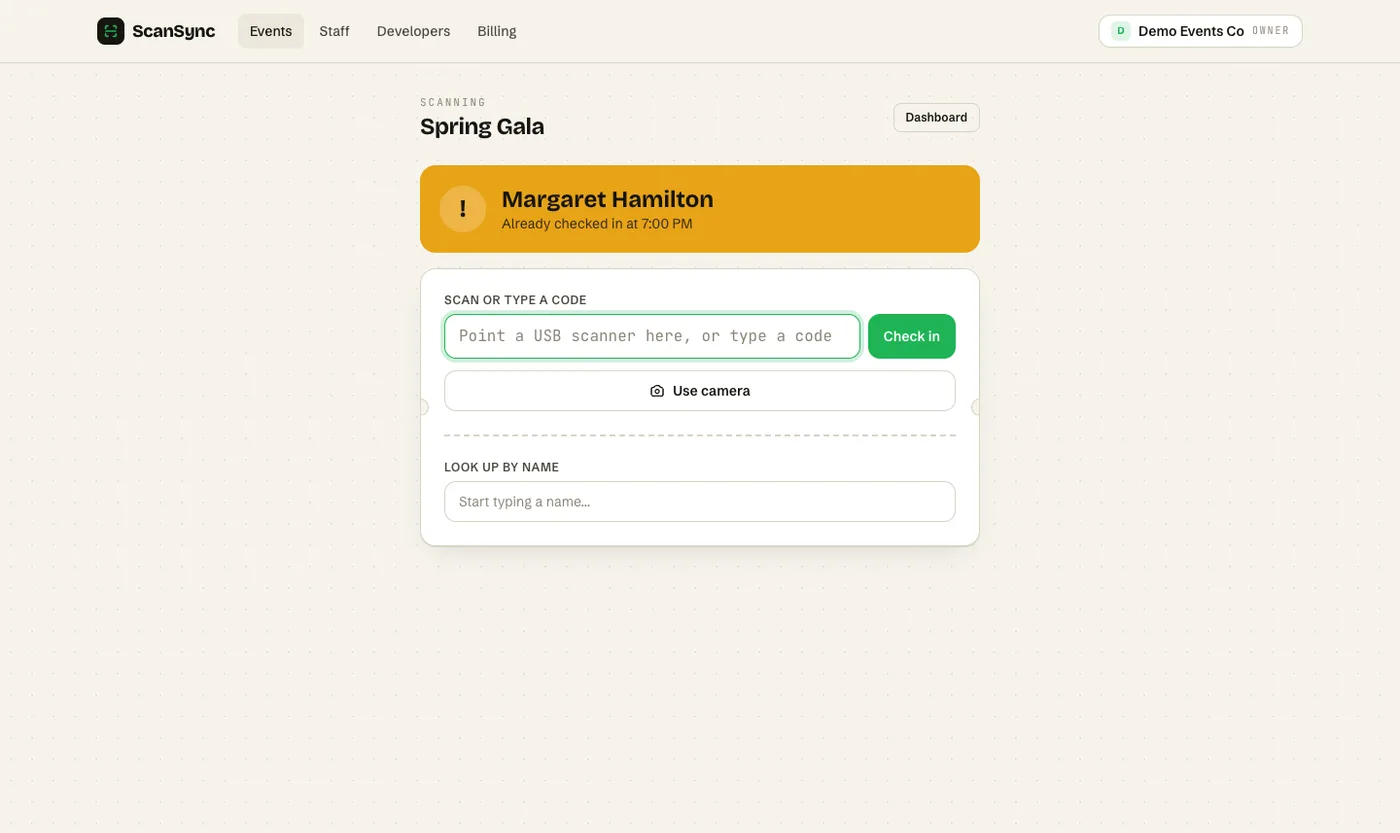 An amber result tells the scanner this guest has already been checked in, so they can send them to the help desk.
The live dashboard shows checked in, still to come, and check-ins per 15 minutes, and updates on every open screen without refreshing, so your door lead can spot a rush as it starts. You can also filter attendees by custom field, which helps if you run separate lanes for different groups.
Summary
To reduce check-in lines, work on three levers: spread arrivals, speed up each scan, and remove blockers from the fast lane. Sending codes in advance and staffing a separate lookup station usually make the biggest difference. Clear signs, an accessible lane, and a greeter in the line keep things moving and fair. Watching arrivals live lets you shift staff before a line grows.
Next steps
Pick three tactics from this list for your next event and try them on a small scale first. If you want codes, color-coded scanning, and a live dashboard in one place, create a free account or look at the features.
Frequently asked questions
What is the fastest way to check in event attendees? +
Scanning a QR code or barcode that each guest already has on their phone or printout is usually fastest, because there is no typing or searching. Pair it with a separate desk for anyone without a code.
How do I stop everyone arriving at the same time? +
Give people a reason to spread out: open doors earlier, offer something worth arriving early for, or assign arrival windows for large groups. Clear communication about when doors open also helps.
How many check-in lanes should I open? +
Estimate your busiest arrivals per minute, divide by how many people one scanner can comfortably handle per minute, and round up. Add a lookup station on top of that.
Check people in the simple way
Upload your list, scan at the door, and watch arrivals live. Free for your first event.